Business Process Operations made easy for everyone

Business Process Operations become easy for everyone when companies use structured workflows. These workflows standardize tasks, connect responsibilities, and guide people through each step. Decision, Loop, and Calculation steps give a clear path, so anyone can follow along and adapt. No one needs special skills to support Resources, serve Clients, or help Customers. Simple steps and clear roles make it possible for every team member to understand and improve daily work.
Key Takeaways
Structured workflows simplify business process operations, making tasks easier for everyone.
Clear roles and responsibilities boost team engagement and reduce confusion.
Streamlining processes can lead to significant productivity gains, saving time and resources.
Automation tools help teams focus on meaningful work by handling repetitive tasks.
Regular training ensures employees understand workflows, building confidence and accountability.
Frequent reviews of processes help identify inefficiencies and keep operations aligned with goals.
Simplicity in operations reduces errors, leading to higher quality and customer satisfaction.
Involving team members in feedback and process mapping fosters collaboration and continuous improvement.
What Are Business Process Operations?

Simple Definition
Business Process Operations describe the activities and workflows that help organizations manage their core functions efficiently. These operations use structured steps to guide tasks from start to finish. Teams rely on clear instructions and defined roles to complete work. The focus stays on transforming inputs into valuable outputs, such as products or services. Unlike broader management concepts, Business Process Operations concentrate on the specific actions that drive productivity and quality. They serve as the backbone of organizational efficiency, helping companies achieve measurable results.
Business Process Operations combine people, processes, technology, and management oversight. This combination shapes how work gets done and ensures that every task supports the company’s goals.
Why They Matter
Business Process Operations play a vital role in every organization. They help boost productivity, reduce errors, and optimize resources. When teams follow structured workflows, they can make decisions faster and adapt to changes more easily. These operations also improve customer satisfaction by delivering consistent results. Companies that invest in automation and process improvement see cost savings and higher performance. A recent survey showed that 84% of teams plan to invest more in automation to enhance their business processes. Inefficient manual processes can cost businesses over $1 million each year, highlighting the importance of well-designed operations.
Component | Description |
|---|---|
Definition | Activities and workflows that manage core business functions efficiently |
Purpose | Enhance productivity, reduce errors, optimize resources, improve satisfaction |
Components | People, processes, technology, performance metrics |
Types | Core processes, support processes, management processes |
Benefits | Streamlined operations, cost savings, faster decisions, scalability |
Tools & Tech | ERP systems, workflow automation, BPM software, AI, analytics |
Best Practices | Process mapping, continuous improvement, standardization, monitoring |
Core, Support, and Management Processes
Organizations divide Business Process Operations into three main types: core, support, and management processes. Core processes handle the main activities that deliver products or services to customers. Support processes provide essential services, such as IT or human resources, that help core functions run smoothly. Management processes oversee planning, monitoring, and improvement, ensuring that all operations align with business goals. A large-scale survey of over 14,000 business processes confirms that companies benefit from clear distinctions between these types. This structure allows organizations to adapt quickly and achieve higher performance. Teams recognize the value of automation and process improvement, which leads to better efficiency and quality.
Clear separation between core, support, and management processes helps organizations respond to changing needs and maintain high standards.
Why Simplicity Matters
Team Benefits
Simplicity in business process operations helps teams work together more effectively. When organizations remove unnecessary steps, employees can focus on tasks that matter. Streamlined workflows reduce confusion and make responsibilities clear. Teams feel more engaged because they spend less time on repetitive or unclear activities. They dedicate their energy to strategic and customer-focused work. This approach builds a positive company culture. Employees feel valued and competent, which improves morale.
A smoother workflow allows teams to collaborate without frustration. They know what to do and when to do it, so they avoid misunderstandings.
Research shows that organizations with high internal complexity face serious challenges. Employees in these companies are three times more likely to feel disengaged. This leads to high turnover and low morale. Executives report that 94% of growth barriers come from internal complexity, not outside competition. On average, 25% of organizational time is wasted on activities that do not improve performance.
Evidence Type | Description |
|---|---|
Employee Engagement | Employees in complex organizations are three times more likely to be disengaged. |
Executive Insight | 94% of executives blame growth barriers on internal complexity. |
Organizational Time | 25% of time is spent on nonessential activities. |
Streamlining processes reduces redundant tasks and confusion.
Employees focus on high-value activities, which increases engagement and satisfaction.
Positive culture grows when employees feel competent and valued.
Boosting Productivity
Simplifying business process operations leads to measurable productivity gains. Teams save time by cutting out unnecessary steps and digitizing workflows. Project managers report saving 20% of their time each day. Administration tasks can be reduced by half. Development teams save thousands of hours, and companies can handle twice the workload. Digitizing processes speeds up deployment and reduces emails by 75%. Customer complaints decrease by 50% when processes become simpler.
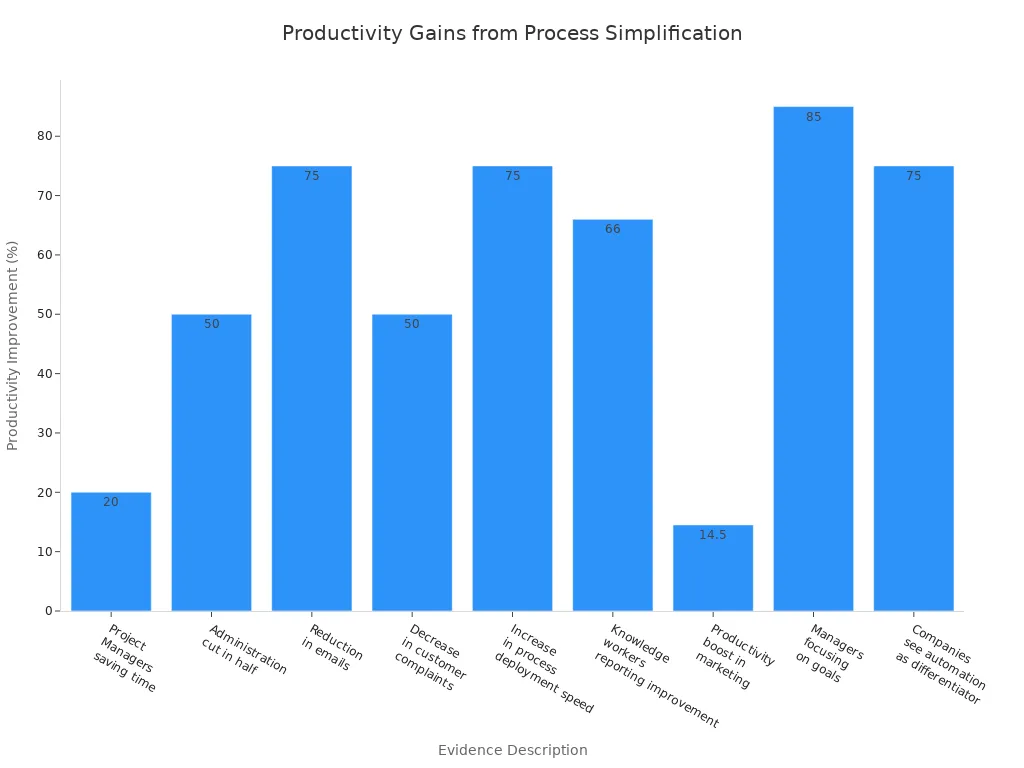
Evidence Description | Statistic |
|---|---|
Project Managers saving time | 20% per day |
Administration cut in half | 50% reduction |
Development hours saved | 3,350 hours |
Increased workload capacity | 2x |
Administration hours saved | 6,000 hours |
Processes digitized | 40 in <10 weeks |
Reduction in emails | 75% |
Decrease in customer complaints | 50% |
Increase in process deployment speed | 75% |
Productivity boost in marketing | 14.5% |
Managers focusing on goals | 85% |
Companies considering automation competitive | 75% |
Knowledge workers report productivity improvements of up to 66%. Time saved on manual tasks ranges from 10% to 50%. Overall efficiency improves by 40% to 60%. Some processes see time savings as high as 77%.
Fewer Errors
Reducing complexity in business process operations lowers error rates. Employees complete tasks more efficiently when they follow simple steps. Less time spent on repetitive, low-value activities means fewer mistakes. Case studies show that process complexity increases error rates by 8% to 12% for each additional handoff. A ten-step process with nine handoffs can have error rates 60% to 80% higher than a simple three-step process. Rework costs in complex organizations can reach 15% to 40% of total operating costs.
Streamlined operations boost productivity and accuracy.
Fewer handoffs and steps mean fewer chances for mistakes.
Lower error rates save money and improve quality.
Simplicity helps teams avoid costly rework and keeps operations running smoothly. Organizations that focus on clear, simple workflows achieve better results and higher quality.
Key Elements Simplified
People
Roles
People form the foundation of every successful operation. Clear roles help everyone understand their responsibilities. When organizations define roles, team members know what to do and how to contribute. This clarity reduces confusion and supports accountability. Organizational culture also shapes how employees act. A positive culture encourages everyone to participate and share ideas.
Encouraging a growth mindset leads to ongoing improvement.
Feedback loops help teams collect suggestions and refine workflows.
Involving suppliers can boost innovation and resource efficiency.
Collaboration
Collaboration brings together different skills and perspectives. Cross-functional teams enable better communication and holistic decision-making. When teams work together, they solve problems faster and create stronger solutions. Enhanced communication among team members ensures that everyone stays informed and aligned.
Teams that communicate well can adapt quickly and deliver better results.
Process
Mapping
Mapping processes gives organizations a clear view of how work flows. Visual representations of workflows make it easier to spot inefficiencies and areas for improvement. Teams often use tools like Lucidchart, Creately, Canva, and Miro to create process maps.
Tool | Features |
|---|---|
Lucidchart | Drag-and-drop interface, range of templates for quick visual diagrams. |
Creately | Flexibility, ease of use, real-time collaboration features. |
Canva | Intuitive design, basic process mapping capabilities. |
Miro | Industry-standard shape packs, AI features for flowchart creation. |
To map a process effectively:
Define the scope and objectives.
Document each step in the process.
Validate the process map.
Process mapping provides a clear visualization of steps, which helps identify inefficiencies. It allows organizations to streamline operations by eliminating redundant steps and optimizing for maximum efficiency.
Streamlining
Streamlining means removing unnecessary steps and focusing on what matters most. Organizations can eliminate waste, reduce costs, and improve performance by redesigning existing processes. Continuous evaluation and iteration keep operations efficient and up to date.
Identifying inefficiencies leads to better results.
Redesigning processes helps teams work smarter, not harder.
Streamlined operations support higher quality and faster delivery.
Technology
User-Friendly Tools
Technology plays a key role in simplifying operations. User-friendly tools make it easy for teams to automate repetitive tasks and focus on meaningful work. Platforms like Microsoft Power Automate, Workato, and Appian help organizations integrate applications and streamline workflows.
These tools handle routine tasks and reduce errors.
Teams can concentrate on strategic initiatives.
When workflows are streamlined, employees feel confident, execute faster, and stay motivated. The result? A more engaged team and better customer experiences.
Automation Basics
Automation frees up time and enhances efficiency. It reduces errors in routine processes and allows for quick adjustments without IT involvement. Each business process management tool offers unique strengths, so organizations can choose the right fit for their needs. Flexibility in processes means teams can adapt quickly to changes.
Automation improves overall efficiency in business operations.
Streamlined platforms simplify processes and boost employee engagement.
Technology enables continuous improvement and supports business growth.
Simplifying Business Process Operations
Map Processes
Mapping processes gives teams a clear view of how work moves from start to finish. They use diagrams to show each step, decision point, and bottleneck. Teams involve stakeholders, such as process owners and key personnel, to make sure the documentation matches real practices. They set clear objectives before starting, which helps everyone stay focused. Teams also define boundaries, so they know where the process begins and ends. Regular reviews help them keep the process simple and efficient.
Step | Description |
|---|---|
Involve Stakeholders | Engage process owners and key personnel to ensure documentation reflects current practices. |
Regular Reviews | Conduct frequent evaluations to remove unnecessary steps and streamline processes. |
Clear Objectives | Define what the team aims to achieve before starting the mapping process. |
Set Boundaries | Establish where the process starts and ends, what it includes, and who is involved. |
Visualize Workflows | Create diagrams to illustrate task movement, decision points, and bottlenecks. |
Teams that map processes can spot inefficiencies and make improvements quickly. They communicate better and keep projects manageable.
Remove Unnecessary Steps
Teams improve efficiency by removing steps that do not add value. Redundant tasks slow down operations and waste resources. When teams eliminate unnecessary approvals or duplicate data entry, they finish projects faster. Integrated processes help employees focus on important work. Reports show that productivity increases by 30% to 50% when teams streamline workflows.
Removing redundant steps speeds up project completion.
Teams see improved productivity and can focus on valuable tasks.
Streamlined workflows reduce wasted time and resources.
Teams that review their processes regularly find ways to simplify work and boost performance.
Use Simple Tools
Simple tools help teams automate tasks and make decisions faster. Automation increases productivity by 0.8% to 1.4%. It reduces operational costs and cuts labor expenses. Teams use automation to process data quickly, which helps them make strategic decisions. Employees feel less burnout because they spend more time on meaningful tasks.
Metric | Description |
|---|---|
Increased productivity | Automation can enhance productivity growth by 0.8%-1.4%. |
Reduced operational costs | Automating administrative tasks cuts labor costs and processing time. |
Improved decision-making | Automation tools provide quick data processing for strategic decisions. |
Reduced employee burnout | Automation allows employees to focus on meaningful tasks. |
Teams that use simple tools in Business Process Operations work smarter and achieve better results.
Train Everyone
Training ensures that every employee understands how to follow and improve Business Process Operations. Clear instructions help workers take ownership of their tasks. Teams perform better when they know exactly what to do. Companies use simple diagrams and visual models to show each step. These tools make processes easy to understand.
Flexible platforms allow organizations to update processes quickly. Employees stay engaged when they see changes that reflect their feedback. Managers encourage a growth mindset by collecting suggestions and making adjustments. Workers feel valued when their input shapes the way the company operates.
Effective training methods include:
Clear and straightforward instructions for each task.
Visual diagrams that highlight steps and decision points.
Platforms that allow easy updates to processes.
Feedback sessions where employees share ideas for improvement.
Managers document and model processes to identify inefficiencies. Automation tools reduce manual effort and help teams focus on important work. Tracking performance with key metrics guides improvements. Continuous improvement becomes part of the culture when everyone participates.
Training builds confidence and accountability. Employees understand their roles and contribute to the company’s success.
Monitor and Improve
Monitoring and improvement keep business processes efficient and effective. Teams track performance using key metrics. Managers review workflows regularly to spot bottlenecks and areas for enhancement. Organizations use process mapping to visualize how work moves through each step.
Continuous improvement is essential for long-term success. Teams collect feedback and make adjustments based on real experiences. Lean and Six Sigma frameworks provide structured methods for eliminating waste and improving quality. These approaches help companies maintain high standards and adapt to changing needs.
Process mapping fosters a culture of ongoing enhancement.
Lean and Six Sigma focus on waste elimination and quality improvement.
Regular reviews ensure processes stay simple and effective.
Monitoring and improvement help organizations respond quickly to challenges. Teams achieve better results and maintain high performance.
Common Mistakes to Avoid
Overcomplicating Steps
Many organizations struggle with process simplification because they add unnecessary steps. Teams often duplicate tasks, which dilutes quality and confuses execution. Small groups sometimes repeat functions, causing unclear responsibilities. Excessive reliance on advanced technology can create a confusing environment. Complex processes make it difficult for employees to understand their roles, leading to underperformance. Poor collaboration between departments increases inefficiencies. When processes lack visibility, businesses face greater risks and lose stakeholder trust.
Process duplication confuses teams and reduces quality.
Technology overload makes workflows harder to manage.
Function duplication leads to unclear roles and inefficiency.
Accountability haze causes underperformance.
Lack of collaboration increases inefficiency.
Poor risk management threatens stakeholder trust.
A recent client discussion revealed that performance issues often stem from complicated systems. Teams work hard, but operational simplicity remains hidden. Organizations must focus on clear, straightforward workflows to avoid these pitfalls.
Ignoring Input
Ignoring input from stakeholders and employees creates blind spots in business operations. When organizations fail to listen, they risk opposition that can threaten project completion. Employees may push back if processes do not match real practices. Stakeholder demands, when neglected, can lead to project failure and increased pressure on the firm.
Mistake | Consequence |
|---|---|
Excluding employee input | Blind spots, pushback during implementation |
Ignoring stakeholder demands | Project failure, increased pressure |
Failing to address impacts | Opposition, risk to project completion |
Teams benefit from gathering feedback and involving all relevant parties. Listening to input helps align processes with actual needs and prevents costly mistakes.
Skipping Training
Neglecting to train employees stands as a major mistake in business process operations. Without proper training, workers lack the knowledge to follow new workflows. This gap leads to confusion and errors. Employees may feel unprepared, which lowers morale and productivity. Organizations that skip training often see resistance to change and slower adoption of new systems.
Training ensures that every team member understands their role and the steps involved. It builds confidence and supports smooth transitions.
Companies must provide clear instructions and ongoing support. Visual aids and simple guides help employees grasp new processes quickly. Regular training sessions keep skills sharp and encourage continuous improvement.
Failing to set clear goals
Focusing only on short-term fixes
Underestimating the importance of technology
Neglecting to train employees
Not measuring progress regularly
Avoiding these mistakes helps organizations streamline operations and achieve better results. Teams that prioritize clarity, feedback, and training build stronger, more efficient workflows.
Not Reviewing
Many organizations overlook the importance of regularly reviewing their business process operations. This mistake can lead to outdated practices, missed opportunities, and increased risk. When teams do not review their processes, they may continue using steps that no longer fit the company’s needs. Old workflows can slow down progress and make it harder to adapt to new challenges.
Business Process Improvement uses a systematic approach to identify, analyze, and enhance existing processes. Regular reviews help organizations find areas that need change. Teams can spot inefficiencies, remove bottlenecks, and update steps to match current goals. Without these reviews, companies may fall behind competitors who focus on continuous improvement.
Outdated policies can leave organizations at risk. Old rules may not comply with new laws or regulations. They might not address new technology, which can cause inconsistent practices and confusion among employees.
A lack of review can also affect compliance and legal safety. Many executives worry that their current policies will not meet future needs. In a recent survey, 69% of executives said they do not feel confident about their existing policies. Only 27% of Chief Compliance Officers believe their organizations have a change management process to update policies when laws or regulations change. This gap can lead to costly mistakes and legal trouble.
Statistic | Insight |
|---|---|
69% of executives | Lack confidence in current policies meeting future needs |
27% of CCOs | Believe their compliance function can manage regulatory changes |
63% of organizations | Say policy management reduces legal costs and resolution time |
Regular reviews help organizations stay compliant and avoid fines. In fact, 63% of organizations report that a strong policy management program reduces legal costs and the time needed to resolve regulatory issues. Teams that review their processes often can respond quickly to changes in the market or industry. They can update their workflows to use new technology or meet new customer demands.
To avoid this mistake, organizations should:
Schedule regular process reviews.
Involve key team members in the review process.
Update policies and workflows to reflect new laws, technology, and business goals.
Track changes and measure the impact of updates.
Reviewing business process operations keeps organizations efficient, safe, and ready for the future. Teams that make review a habit can adapt faster and perform better.
Practical Tools and Tips

Automation Tools (ProcessMaker, Nintex, Kissflow, Zapier)
Automation tools help teams simplify daily tasks and improve efficiency. Many small and medium-sized businesses choose tools that require little or no coding. These platforms allow users to build workflows without needing IT support. Teams can automate approvals, data collection, and routine processes.
Kissflow offers a user-friendly interface and no-code features. It works well for businesses that do not have dedicated IT staff. Kissflow helps teams manage automated workflows and simplifies common tasks.
Nintex provides robust features and strong integration options. Mid-sized companies use Nintex to connect different systems and streamline operations.
Microsoft Power Automate supports integration across many platforms. It meets the needs of mid-sized businesses and helps automate repetitive tasks.
Zapier connects apps and automates workflows. Teams use Zapier to link tools and reduce manual work.
These tools empower employees to manage their own workflows and make Business Process Operations easier for everyone.
Best Practices
Teams maintain simplicity by following proven best practices. Clear design and regular improvement keep workflows efficient and reliable.
Strive for simplicity and clarity in every process. Avoid making solutions too complex or too simple.
Anticipate changes over time. Build systems that can grow and adapt.
Offload cross-cutting concerns to separate services. This reduces code duplication and keeps processes clean.
Evaluate common patterns and practices. Choose only what fits the team’s needs to avoid unnecessary complexity.
Monitor workflows and seek feedback from team members. Use real-time input to make incremental improvements.
Speed: Simple processes move faster and increase output.
Clarity: Clear workflows help team members understand their tasks.
Reliability: Fewer moving parts mean fewer errors and more consistent results.
Teams should establish clear objectives, involve stakeholders, and document current workflows. Technology and automation simplify tasks, while tracking performance with KPIs supports continuous improvement. Flexible and resilient processes help organizations adapt to new challenges.
Business process mapping serves as a critical tool in this endeavor, providing a visual representation that helps organizations identify areas for improvement.
Learning Resources
Individuals seeking to simplify operations can access a variety of learning resources. These tools and technologies support process improvement and automation.
Resource Type | Description |
|---|---|
Software suites designed to manage and optimize business processes. | |
Robotic Process Automation (RPA) | Technology that automates repetitive tasks to improve efficiency. |
Enterprise Resource Planning (ERP) | Systems that integrate core business operations for better management. |
Business Process Automation (BPA) | Platforms that automate business processes to enhance productivity. |
AI and Machine Learning (ML) | Technologies that provide advanced automation and intelligent decision-making capabilities. |
Customer Relationship Management (CRM) | Systems that manage a company's interactions with current and potential customers. |
Process Mining | Techniques used to analyze and improve business processes based on data. |
Low-code Development | Platforms that allow users to create applications with minimal coding, streamlining development. |
Teams can use these resources to learn new skills and improve their workflows. They gain knowledge about automation, process mapping, and performance tracking. These tools help organizations stay competitive and efficient.
Real-Life Example
Small Business Workflow
Many small businesses face challenges with complex processes. They often struggle with unclear instructions, repeated tasks, and slow service. A company called systems and teams helps clients address these issues by guiding them through process simplification.
One client, a local bakery, wanted to improve its order management. The bakery team mapped out each step, from taking orders to delivering products. They found several unnecessary steps, such as double-checking orders by two different people and using both paper and digital records. The team removed these extra steps and created a single, clear workflow.
The bakery used simple tools to automate order tracking. Employees received training on the new process. The team also set up regular reviews to keep the workflow efficient. These changes made a big impact on daily operations.
Streamlined workflows help employees feel confident and motivated. They complete tasks faster and provide better service to customers.
The table below shows the benefits that small businesses experience when they simplify their business process operations:
Benefit | Description |
|---|---|
Clarity | Teams understand each step and their responsibilities. |
Time Savings | Employees finish tasks faster by removing unnecessary steps. |
Improved Service | Customers receive faster and more reliable service. |
Employee Confidence | Workers feel more confident and motivated. |
Smoother Operations | The business runs more smoothly with fewer mistakes. |
Lessons Learned
The experience of systems and teams’ clients highlights several important lessons. First, even small changes can make a big difference. Removing redundant steps and confusing instructions leads to smoother operations. Teams that use clear workflows avoid mistakes and save time.
Second, training plays a key role. When everyone understands the process, they work together more effectively. Regular reviews help teams spot problems early and keep improving.
Third, simple tools and automation support better results. Employees spend less time on routine tasks and more time serving customers. This approach boosts morale and creates a positive work environment.
Small businesses do not need complex systems to succeed. Clear steps, regular training, and simple tools help teams achieve their goals.
The story of the bakery shows that process improvement is possible for any organization. By focusing on clarity and teamwork, small businesses can deliver better service and grow with confidence.
Business process operations become easier when teams use clear steps, simple tools, and regular training. Streamlined workflows help organizations boost productivity and reduce errors. Anyone can improve processes by mapping tasks, removing unnecessary steps, and monitoring progress.
Simplifying operations increases efficiency.
Training and feedback build strong teams.
Automation tools support better results.
Start streamlining today. For more guidance or resources, contact the team to learn how to make business process operations easy for everyone.
FAQ
What are business process operations?
Business process operations describe the steps and activities that help organizations complete tasks. Teams use structured workflows to achieve goals and deliver products or services.
Why should teams simplify business process operations?
Simplified operations help teams work faster and make fewer mistakes. Clear steps improve productivity and boost employee confidence.
How can technology support business process operations?
Technology automates repetitive tasks and connects different systems. User-friendly tools help teams manage workflows and track progress.
What is process mapping?
Process mapping shows each step in a workflow. Teams use diagrams to find bottlenecks and improve efficiency.
How often should organizations review their processes?
Teams should review processes regularly. Frequent reviews help spot outdated steps and keep workflows efficient.
What are common mistakes in business process operations?
Teams often overcomplicate steps, ignore feedback, skip training, and forget to review workflows. Avoiding these mistakes improves results.
Do small businesses need complex tools for process improvement?
Small businesses can use simple tools. Clear workflows and basic automation help teams save time and reduce errors.
How does training help with business process operations?
Training teaches employees how to follow workflows. It builds confidence and helps teams work together effectively.


