How Small Businesses Can Automate Their Processes Easily

Small businesses can automate business processes without advanced technical knowledge. Many owners now make automation a top priority, with 43% reporting strong interest. Automation saves time, often up to 15 hours per week, and helps reduce manual errors. Businesses benefit from improved compliance and access to analytics that support business management and sales growth.
Source | |
|---|---|
Intuit & ICIC (2025) | 89% |
NFIB Report | 24% |
Merca 2.0 | 25% (integrated) and 50% (exploring) |
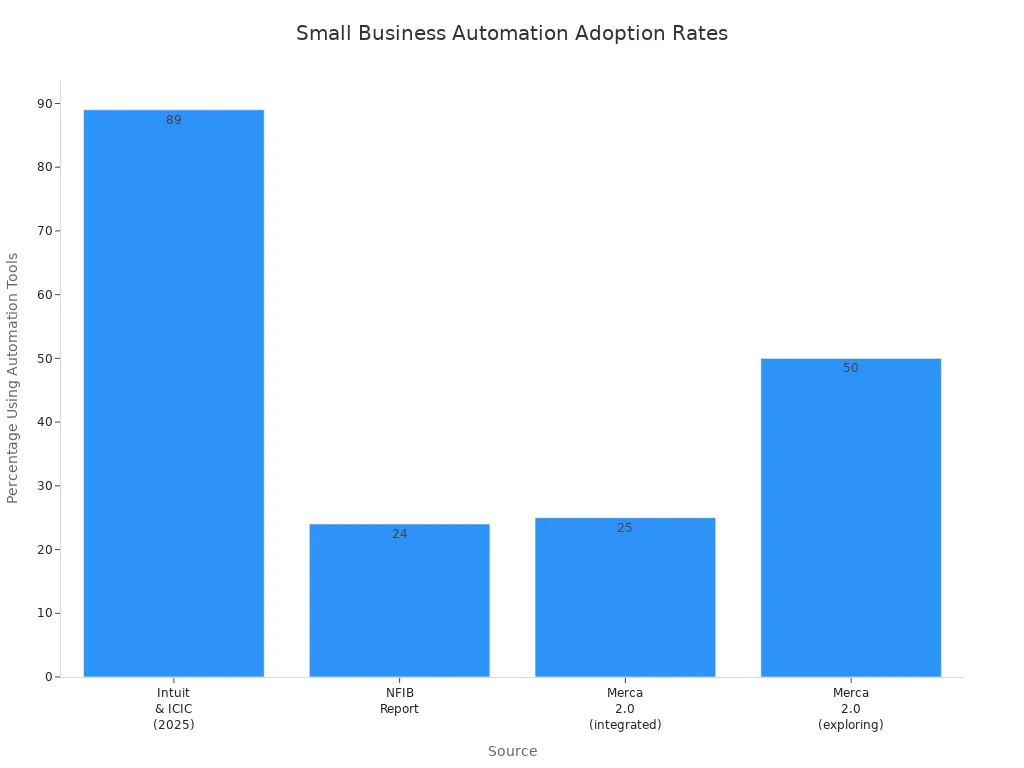
Automation remains affordable and accessible for everyone.
Key Takeaways
Automation saves small businesses time, often up to 15 hours a week, allowing owners to focus on growth.
Reducing manual errors through automation can prevent costly mistakes and improve a business's reputation.
Automating tasks boosts productivity, enabling employees to concentrate on higher-value work like customer service.
Staying competitive is crucial; automation helps small businesses keep up with market changes and customer expectations.
Common processes to automate include invoicing, customer communication, and inventory management for better efficiency.
Choosing the right automation tools is essential; consider ease of use, integration, and cost before making a decision.
Start small by automating one or two repetitive tasks to see quick wins and build confidence in automation.
Regularly monitor and improve automated processes to ensure they continue to deliver value as the business grows.
Why Automate Business Processes
Save Time and Reduce Errors
Small businesses often face repetitive tasks that consume valuable hours. Automation helps owners and employees reclaim time by handling these tasks quickly and accurately. Workers spend up to 40% of their time searching for and organizing information. Automating these processes ensures that decisions rely on accurate data, not guesswork. Many companies report saving between 240 and 360 hours each year by automating routine work. In fact, 73% of IT leaders say automation allows employees to save 10-50% of their time previously spent on manual tasks. This time can be redirected toward more important activities, such as serving customers or growing the business.
Source | Time Saved (Hours per Year) |
|---|---|
DocuClipper | 240 |
Company Leaders | 360 |
Automation also reduces errors. Manual data entry often leads to mistakes that can cost businesses money and reputation. By using automation, small businesses can cut operational costs and improve efficiency. Inefficient processes may cost up to $1.3 million each year, but automation helps prevent these losses.
Reason for Automation | Description |
|---|---|
Cost Savings | Businesses can lose up to $1.3M every year on inefficient processes. Automation helps cut operational costs and improve efficiency. |
Increased Efficiency | Workers spend 40% of their time looking for and organizing information. Automation ensures informed decisions based on accurate data. |
Boost Productivity
Automation allows employees to focus on higher-value tasks. When businesses automate business processes, staff can spend more time on creative problem-solving and customer service. This shift leads to greater output per employee and faster processing times. Automation also improves first-pass yield rates, which means fewer errors and less rework.
Metric | Impact of Automation |
|---|---|
Increase in output per employee | Automation allows employees to focus on higher-value tasks, leading to increased output. |
Reduction in processing times | Automation streamlines processes, reducing the time taken for tasks. |
Improved first-pass yield rates | Automation enhances quality, resulting in fewer errors and rework. |
AI-driven automation can boost productivity by up to 40%. Experts predict that work automation could contribute to productivity growth of 0.5% to 3.4% each year through 2040. These improvements help small businesses achieve more with the same resources.
Stay Competitive
Small businesses must keep up with changing markets and customer expectations. Automation helps them stay ahead by streamlining workflows and increasing output. Studies show that 60% to 70% of work activities can be automated, which gives businesses a strong advantage. Investments in automation often yield returns between 30% and 200% in the first year because of cost reductions and increased output.
Over 90% of small and medium businesses plan to integrate automation to stay competitive.
More than half of small businesses are exploring AI, and 25% have already integrated it into daily operations. The adoption of AI and automation is now seen as essential for staying competitive in any industry.
Reason for Automation | Description |
|---|---|
Automation allows small businesses to accomplish more with fewer resources, ensuring staff is engaged in high-value work. | |
Improved Employee Engagement | Automating HR processes can minimize staffing costs and support employee retention. |
Automate business processes to save time, reduce errors, boost productivity, and maintain a competitive edge. These benefits make automation a smart choice for small businesses seeking growth and efficiency.
Processes to Automate
Invoicing and Payments
Small businesses often choose to automate invoicing and payments first. This process involves generating invoices, sending payment reminders, and tracking collections. Automation reduces administrative costs and minimizes human errors. Owners see faster payment collections and improved cash flow management. Clients experience smoother transactions with easy-to-pay options and digital signatures. Automated systems also provide accurate forecasting and proactive management of invoice issues.
Benefit | Description |
|---|---|
Reduce Administrative Costs | Saves time on manual data entry and lowers operational costs. |
Fewer Human Errors | Ensures accurate data entry and standardized invoices. |
Quicker Payment Collections | Generates invoices faster and sends automatic payment reminders. |
Improved Cash Flow Management | Enables better management of finances with efficient tracking. |
Enhanced Client Experience | Offers easy payment options and digital signatures for clients. |
Invoice Tracking and Reporting | Allows close monitoring of financial health and business performance. |
Automated reminders help businesses collect payments faster and address invoice issues promptly. Many owners use predictive components to monitor revenue and payments, which supports better financial planning.
Customer Communication
Automating customer communication improves response times and customer satisfaction. Businesses use tools like chatbots and automated email replies to answer questions quickly. These tools provide 24-hour availability, so customers receive support at any time. Personalized interactions become possible through data insights, which enhance the customer experience.
Benefit | Description |
|---|---|
Faster Response Times | Automation enables quicker responses to customer inquiries. |
Personalized interactions through data insights lead to better customer experiences. | |
24-Hour Availability | Automated tools like chatbots provide support at any time. |
AI-powered chatbots respond immediately to customer questions. If a chatbot cannot resolve an issue, it escalates to a human or sends an email to the support team. Automation allows a single support person to manage multiple inquiries efficiently.
Social Media Tasks
Small businesses automate social media tasks to improve marketing outcomes. Owners schedule posts, manage campaigns, and track engagement without manual effort. Nearly 80% of businesses using marketing automation report increased lead generation and improved sales efficiency. Automated communications help clients feel valued and engaged.
Scheduling posts ensures consistent online presence.
Automated replies maintain engagement with followers.
Tracking analytics helps owners measure campaign success.
Automating routine social media tasks allows business owners to focus on building relationships and providing quality service. These improvements support growth and help businesses stay competitive.
Many small businesses automate business processes such as email marketing, customer support, payroll processing, invoice generation, social media posting, inventory management, employee onboarding, data backups, sales funnel management, and report generation.
Inventory Management
Small businesses often struggle to keep track of inventory. Automation helps owners manage stock levels and avoid costly mistakes. Automated systems update quantities in real time, which allows businesses to make data-driven decisions quickly. Owners can see which products sell best and which items need restocking. This approach prevents stockouts and overselling, which improves customer satisfaction.
Automated inventory management systems track stock movements and synchronize information with financial records. These systems eliminate duplicate data entry and reduce the risk of errors. Owners spend less time on manual updates and more time focusing on growth opportunities. Predictive AI-powered insights offer recommendations based on historical sales and demand patterns. Businesses can set custom triggers for automatic reordering, which ensures shelves stay stocked without constant manual checks.
Feature | Benefit |
|---|---|
Real-time tracking | Prevents overselling and streamlines order fulfillment by providing up-to-the-minute inventory data. |
Automated stock reordering | Manages inventory levels without constant manual checks through custom threshold triggers. |
Seamless integrations | Eliminates duplicate data entry and keeps information unified by synchronizing with financial systems. |
Predictive AI-powered insights | Provides real-time inventory recommendations based on historical data and demand patterns. |
Automated inventory management offers several advantages:
No more duplicate data entry.
Faster invoicing and order processing.
Reduced risk of customer disputes.
More accurate financial reports.
Automated inventory management enables small businesses to avoid stockouts and seize growth opportunities without the hassle of manual updates.
HR Workflows
Human resources tasks often require careful attention to detail. Automation streamlines HR workflows and helps businesses maintain compliance. Automated systems track employee information, manage payroll, and schedule training sessions. Owners can store essential records securely and access them when needed.
Automating HR processes improves data visibility and supports team growth. HR staff spend less time on paperwork and more time building a positive workplace. Digital systems eliminate manual recordkeeping and reduce paper processing costs. This approach saves money and benefits the environment. Automated workflows also enhance productivity by allowing HR teams to focus on other important tasks.
Mistakes in documentation can lead to compliance issues. Automation minimizes errors and ensures that businesses meet training and certification requirements. Employees experience fewer delays and enjoy a smoother onboarding process. Satisfied employees are less likely to leave, which reduces turnover rates.
Key advantages of automating HR workflows include:
Enhanced employee experience by freeing HR from admin tasks.
Elimination of manual recordkeeping.
Reduced paper processing costs.
Increased productivity.
Fewer errors in documentation.
Lower employee turnover.
Assured compliance with regulations.
Automating HR workflows helps small businesses maintain security, support employee satisfaction, and ensure compliance with legal requirements.
Choosing Automation Tools

Selecting the right automation tools helps small businesses achieve better results with less effort. Owners should focus on tools that match their needs and support growth. Many options exist, but not all tools offer the same features or ease of use.
What to Look For
When choosing automation tools, small businesses should consider several important factors:
Define measurable outcomes to guide tool selection.
Research industry-specific tools for proven success.
Evaluate integration and compatibility with existing systems.
Assess scalability and flexibility for future growth.
Review user experience and ease of use for team adoption.
Consider security and compliance with regulations.
Evaluate cost and return on investment (ROI).
Pilot the tool before full implementation to test effectiveness.
Continuously monitor and optimize the tool's performance.
Ease of Use
A tool with an intuitive interface allows teams to start quickly. Many small businesses prefer platforms with drag-and-drop features or templates. These options help users automate tasks without coding skills. User-friendly tools encourage team adoption and reduce training time.
Cost
Cost plays a major role in tool selection. Many automation platforms offer flexible tier pricing, which supports businesses as they grow. Owners should compare subscription fees, free plans, and the value provided. Reviewing the return on investment ensures the tool fits the budget and delivers results.
Integration
Integration with existing systems is essential. The best tools connect with popular apps and services, reducing manual data entry. Modular design and compatibility with current software help businesses automate business processes smoothly.
Popular Tools Overview
Many small businesses use automation tools to manage tasks and improve efficiency. The following platforms stand out for their features and popularity:
Power Automate
Power Automate works well for businesses that use Microsoft products. It offers over 500 connectors and supports advanced logic, loops, and robotic process automation (RPA). Power Automate provides both cloud and on-premise hosting options. It includes strong security features, such as HIPAA and GDPR compliance. Microsoft users benefit from deep integration and support.
Salesforce Flow
Salesforce Flow helps businesses automate workflows within the Salesforce ecosystem. It supports complex processes, such as lead management and customer follow-up. Users can create flows with a visual interface, making it easier for non-technical staff to build automations. Salesforce Flow also offers strong compliance and security features.
Zapier and n8n
Zapier connects over 8,000 apps, making it ideal for businesses with diverse tech stacks. Its no-code interface and templates allow beginners to automate tasks quickly. Zapier operates as a cloud-based service with live chat and email support.
n8n offers an open-source solution for those who want more control. It allows custom workflows and API connections. n8n is free to self-host, which makes it affordable for startups. However, it requires more technical knowledge compared to Zapier.
Feature | Zapier | Power Automate | n8n (Open Source) |
|---|---|---|---|
Best For | Broad tech stacks | Microsoft users | Technical teams, startups |
App Integrations | 8,000+ apps | 500+ connectors | Custom, growing library |
Ease of Use | Beginner-friendly, no-code | Moderate learning curve | Advanced, customizable |
Pricing | Free plan, paid tiers | Included in Microsoft 365 | Free to self-host |
Security & Compliance | SOC 2, CCPA, GDPR | HIPAA, SOC 2, GDPR, FedRAMP | Depends on setup |
Low-code and AI-powered tools help non-technical users automate business processes. These platforms reduce development costs, speed up workflow creation, and allow team members to contribute without coding skills. AI features automate routine tasks, provide data analysis, and support better decision-making.
Tip: Start with a tool that matches your current needs and offers room to grow. Test the platform with a small project before expanding its use.
Getting Started Steps
Identify Repetitive Tasks
Small business owners often find that certain tasks repeat every week. These tasks might include sending follow-up emails, generating reports, or updating spreadsheets. To begin, they should look for activities that follow a clear pattern and take up a lot of time. Tracking these tasks helps owners see where time goes and which jobs slow down the team.
A simple way to start involves these steps:
List out all tasks completed each week.
Highlight those that repeat often, such as lead follow-up or invoice creation.
Choose one or two tasks that take the most time or cause the most frustration.
Track how long these tasks take to complete.
Tip: Start small. Focus on one or two repetitive tasks before trying to automate everything at once.
By identifying these tasks, owners can see where automation will have the biggest impact. They can then select tools that fit their needs and test new workflows in small steps.
Set Automation Goals
Setting clear goals helps businesses measure the success of automation. Owners should make sure each goal is specific, measurable, achievable, relevant, and timely. This approach, often called the SMART method, keeps efforts focused and results easy to track.
Criteria | Description |
|---|---|
Specific | Goals should be clear and specific to focus efforts. |
Measurable | Goals must be measurable to track progress. |
Achievable | Goals should be realistic and attainable. |
Relevant | Goals must align with broader business objectives. |
Timely | Goals should have a defined timeline for completion. |
For example, a business might want to increase lead volume, improve conversion rates, boost revenue growth, or raise customer retention. Owners should pick one or two key metrics to track. They can then measure progress and adjust their approach as needed.
Note: Clear goals make it easier to show the value of automation to the whole team.
Test and Launch
Testing new automation processes ensures they work as expected. Owners should start with a small pilot project in one department or for one task. This approach helps catch problems early and builds confidence in the new system.
Best practices for testing and launching automation include:
Track important metrics like time saved, fewer errors, and customer satisfaction.
Review and refine workflows regularly. Automation works best as an ongoing process, not a one-time setup.
Train employees on new tools so everyone can use them well.
Keep a balance between automation and personal service, especially in areas where customers expect a human touch.
Best Practice | Description |
|---|---|
Start with a Clear Automation Strategy | Develop a plan to guide which tasks to automate and how to test them. |
Prioritize Tests for Automation | Focus on tasks that happen often and have the biggest impact. |
Use the Right Tools | Pick automation tools that fit the business’s current systems. |
Foster Collaboration Between Teams | Involve staff from different areas to get the best results. |
Start small with quick wins. Proving value early helps get the team on board and builds momentum for bigger projects.
By following these steps, small businesses can automate business processes in a way that saves time, reduces errors, and supports growth.
Monitor and Improve
Small businesses achieve the best results from automation when they treat it as an ongoing process. Monitoring and improving automated workflows ensures that systems continue to deliver value as the business grows and changes. Owners and managers should regularly review their automated processes to spot issues and find new opportunities for efficiency.
A step-by-step approach helps teams stay on track:
Identify Bottlenecks
Teams should conduct regular audits of automated workflows. These audits help find tasks that still take too much time or cause frequent errors. For example, if an automated invoice system still leads to late payments, the team should investigate why delays happen.Map Manual Processes
Creating flowcharts or diagrams of current processes gives everyone a clear view of how work moves through the business. Visual maps make it easier to spot unnecessary steps or areas where automation could help even more.Choose the Right Tools
As the business grows, needs may change. Teams should review their automation tools to make sure they still fit the company’s goals and budget. Sometimes, switching to a new tool or adding features can solve problems that appear over time.Start with Low-Risk Workflows
When making improvements, teams should focus first on simple, repetitive tasks. These tasks carry less risk and offer quick wins. Success in these areas builds confidence and helps the team learn how to manage more complex automations later.Monitor, Test, and Improve
Setting clear key performance indicators (KPIs) helps measure the success of each automated process. Teams should track metrics like time saved, error rates, and customer satisfaction. Regular reviews allow for adjustments and fine-tuning. For example, if a chatbot receives negative feedback, the team can update its responses or add new features.
Tip: Automation works best when teams treat it as a cycle—plan, test, review, and improve. Regular feedback from employees and customers helps keep processes efficient and effective.
A simple table can help track progress:
Step | What to Check | How Often |
|---|---|---|
Audit workflows | Time spent, errors, delays | Quarterly |
Review process maps | Unnecessary steps, manual work | Twice a year |
Evaluate tools | Features, costs, integration | Annually |
Update KPIs | Relevance, clarity, results | As needed |
By following these steps, small businesses can keep their automation efforts on track. Regular monitoring and improvement ensure that automated processes continue to save time, reduce errors, and support business growth.
Real-World Automation Examples

Appointment Reminders
Many small businesses rely on automated appointment reminders to improve attendance and customer satisfaction. Systems and teams have helped clients streamline their scheduling processes by using digital tools. For example, a local wellness center adopted automated reminders through AI Front Desk. Their team saw a dramatic drop in missed appointments. The no-show rate fell from 30% to just 15%. Clients responded positively, with satisfaction scores rising from 75% to 92%. These results show that proactive communication can make a big difference for both businesses and their customers.
A wellness center used AI Front Desk for appointment reminders.
The no-show rate decreased by 50%.
Client satisfaction improved from 75% to 92%.
Automated reminders help businesses save time and keep schedules organized. Teams can focus on providing quality service instead of chasing down confirmations.
Order Processing
Order processing often takes up valuable time for small businesses. Automation systems and teams have supported clients in speeding up these tasks and reducing costs. Newegg, for instance, used Perfect Pick to cut its order cycle time to just 20 minutes. NPFulfillment managed to scale up during Black Friday, increasing orders from 12,000 to 40,000 without hiring extra staff. Kookaburra reduced its labor needs by 65% and boosted sorting rates to 2,400 items per hour. Their costs per order dropped by 470%. These examples highlight how automation can help businesses handle more orders and grow without extra resources.
Newegg reduced order cycle time to 20 minutes with automation.
NPFulfillment scaled from 12,000 to 40,000 orders without increasing staff.
Kookaburra cut labor by 65% and lowered costs per order by 470%.
Automation in order processing allows teams to work faster and smarter. Businesses can meet customer demand and keep expenses low.
Social Media Scheduling
Marketing teams at systems and teams have found success with automated social media scheduling. Automation tools help businesses plan posts, maintain a steady online presence, and reach more customers. The table below shows key outcomes from automating social media tasks:
Outcome | Explanation |
|---|---|
Time Savings | Businesses plan content ahead, freeing up time for other work. |
Maintains Consistency | Scheduled posts keep the audience engaged, even during busy periods. |
Optimizes Posting Times | Tools identify the best times to post, increasing customer interaction. |
Improved Data Collection | Automation gathers data from different platforms, helping teams make better marketing decisions. |
Enhanced Online Presence | Consistent posting boosts visibility and engagement, strengthening the brand’s social media presence. |
Automated scheduling lets teams focus on creative content and customer engagement. Businesses see better results with less effort.
Tips for Success
Start Small
Small businesses often achieve better results by starting with manageable automation projects. Owners can select one or two tasks that repeat often and take up valuable time. They may choose to automate email marketing, schedule social media posts, or simplify financial operations. These projects help teams see quick wins and build confidence.
Email automation streamlines marketing efforts by scheduling emails and tracking performance.
Social media automation allows businesses to schedule posts and manage engagement.
Finance and accounting automation reduces errors and saves time.
Sales automation improves efficiency by automating follow-ups and lead scoring.
Customer support automation uses chatbots for faster responses.
HR and payroll automation increases accuracy in recruitment and payroll tasks.
Tip: Starting with simple automation projects helps teams learn and adapt. Quick wins encourage further improvements and make the transition smoother.
Involve Your Team
Successful automation depends on team involvement. Owners who engage employees in automation projects foster collaboration and build trust. Team members often provide valuable insights into which processes need improvement. Their firsthand experience guides the automation strategy and ensures buy-in.
Engaging stakeholders encourages collaboration and trust.
Involving team members in decision-making aligns automation with business goals.
Training and support empower teams to adapt to new systems.
Employees can identify processes that benefit most from automation.
Their experience helps shape effective strategies.
Assessments by employees highlight inefficiencies that management may overlook.
Note: Teams that participate in automation projects feel more invested in the outcome. Their feedback leads to solutions that fit real operational needs.
Keep Learning
Continuous learning helps small businesses stay ahead in automation. Owners and teams can access guides, tutorials, and community forums to expand their knowledge. Resources such as "From Chaos to Clarity: The Small Business Guide to Smarter Workflow Automation" offer practical advice and links to further learning. The Small Business Administration’s Learning Center provides tutorials, templates, and forums for operational improvement. Articles like "Small Business Automation: 15 Affordable Solutions That Actually Work in 2025" discuss affordable solutions and highlight the benefits of automating repetitive tasks.
Guides on workflow automation offer practical insights.
The Small Business Administration’s Learning Center features tutorials and templates.
Community forums allow owners to share experiences and learn from others.
Articles on automation solutions help businesses find affordable options.
Tip: Regular learning keeps teams informed about new tools and strategies. Staying updated ensures that automation continues to deliver value as the business grows.
Overcoming Challenges
Small businesses often face several obstacles when automating their processes. Understanding these challenges helps owners prepare and respond effectively. The most common issues include resistance to change, managing costs, and ensuring data security.
Addressing Change
Change can create uncertainty among employees. Many workers worry about job security or feel uncomfortable with new technology. Owners must address these concerns to ensure successful automation. They can start by communicating openly about upcoming changes and their impact. Leaders who reassure employees about job security and highlight the benefits of automation foster a positive environment.
Owners should involve employees in decision-making. This approach encourages collaboration and builds trust.
Establishing a culture that embraces change helps teams adapt quickly.
Transparent communication and effective leadership support a smooth transition.
Tip: Owners who listen to employee feedback and provide training help teams feel confident about new systems.
A comprehensive strategy that considers both human and technological aspects leads to better results. When employees understand how automation improves their work, resistance decreases.
Managing Costs
Budget constraints often make automation seem out of reach for small businesses. Upfront costs can be significant, so careful planning is essential. Owners should evaluate the return on investment before committing to new tools. Starting with quick wins, such as digital receipt capture or basic email autoresponders, helps demonstrate value early.
Time Frame | Actions to Take |
|---|---|
First 30 days | Begin with simple automations like digital receipt capture and email autoresponders. |
60-day plan | Integrate core systems and set up advanced workflow triggers. |
90-day goals | Fine-tune automation with cross-platform data sync and advanced reporting. |
Key Metrics | Track time savings, cost efficiency, and quality improvements. |
Owners should measure time saved, cost efficiency, and quality improvements. Tracking metrics such as minutes saved per task and error rate reduction helps assess the impact of automation. Avoiding rigid systems and maintaining necessary human oversight prevents frustration for both employees and customers.
Note: Small businesses benefit from starting small and scaling automation as resources allow.
Data Security
Protecting sensitive information remains a top priority for small businesses. Automation introduces new risks, especially when integrating multiple systems. Owners must ensure compliance with regulations and safeguard customer data. Choosing automation tools with strong security features helps reduce vulnerabilities.
Regularly update software to address security threats.
Limit access to sensitive data and monitor user activity.
Train employees on best practices for data protection.
Challenge | Description |
|---|---|
Managing Data Security | Ensuring compliance with regulations and protecting sensitive information is crucial. |
Integration with Existing Systems | Many software applications may not communicate, making integration critical for successful automation. |
Staying informed about technological advancements and security standards helps owners respond to new threats. Ongoing monitoring and maintenance ensure that automated systems remain secure as business needs evolve.
Owners who prioritize data security build trust with customers and protect their business from costly breaches.
Small businesses can automate business processes with simple steps and practical tools. Owners who start with one task often see quick results. Reviewing the outlined strategies builds confidence and helps teams move forward. Automation supports growth and reduces errors. Anyone interested in learning more or seeking guidance can reach out to us for further information or assistance.
Take the first step today and unlock new opportunities for your business.
FAQ
What is business process automation?
Business process automation uses technology to complete repetitive tasks. It helps small businesses save time, reduce errors, and improve efficiency. Owners can automate tasks like invoicing, customer communication, and inventory tracking.
Do small businesses need technical skills to automate?
Most modern automation tools require little or no coding. Many platforms offer drag-and-drop interfaces and templates. Teams can set up basic automations with simple instructions and online guides.
How much does automation cost for small businesses?
Costs vary by tool and features. Many platforms offer free plans or affordable monthly subscriptions. Owners should compare options and choose tools that fit their budget and needs.
Can automation replace employees?
Automation handles repetitive tasks. It does not replace employees but allows them to focus on higher-value work. Teams can spend more time on customer service and business growth.
What are the risks of automation?
Risks include data security concerns and possible errors in setup. Owners should choose secure tools, update software regularly, and train staff. Monitoring automated processes helps catch problems early.
Which business tasks are easiest to automate first?
Tasks like sending invoices, scheduling social media posts, and responding to customer emails are easy to automate. These processes follow clear steps and happen often.
How can a business measure automation success?
Teams can track time saved, error reduction, and improved customer satisfaction. Setting clear goals and using key performance indicators (KPIs) helps measure results.
Can automation tools work with existing software?
Many automation tools integrate with popular business apps. Owners should check compatibility before choosing a tool. Integration ensures smooth data flow and reduces manual entry.


