Business Process Management System makes work easier for everyone

A Business Process Management System helps employees and managers work smarter every day. This methodology streamlines tasks, reduces manual entry, and strengthens teamwork. Employees from every department find these systems easy to use, not just IT experts. Many companies face issues like siloed departments, unclear objectives, and limited resources. The table below shows how a Business Process Management System addresses these challenges with practical solutions and measurable results.
Challenge Type | Challenge Description | Suggested Solution | KPI |
|---|---|---|---|
Organizational Challenges | Siloed departments | Collaborative BPM platforms | Number of cross-functional processes |
Limited resources | High-impact, low-complexity improvements | Process improvement ROI | |
Strategic and Leadership Challenges | Unclear objectives | Define measurable BPM goals | Clarity score from stakeholder surveys |
Key Takeaways
BPMS helps automate tasks, reducing manual work and errors.
It improves teamwork by connecting departments and sharing information.
Real-time monitoring allows quick responses to issues.
BPMS streamlines approvals, speeding up decision-making.
Employees focus on important tasks, boosting productivity.
Managers gain insights with performance metrics and data.
Training ensures everyone can use BPMS effectively.
Continuous improvement keeps processes efficient and relevant.
What is a Business Process Management System?
Core Purpose and Definition
A Business Process Management System helps organizations manage, automate, and improve their business processes. This system covers the entire process lifecycle, including design, execution, monitoring, and optimization. It assigns tasks, tracks progress, and connects with other systems like CRM and HRM. By using a Business Process Management System, companies can spot problems quickly and make changes that boost efficiency.
Note: Business Process Management is a strategic approach. It focuses on making sure every process follows a clear, repeatable path. This leads to better control and higher productivity.
The table below shows the main functions and features found in industry-standard systems:
Function/Feature | Description |
|---|---|
Platform for management | Helps organizations manage, automate, and optimize business processes. |
Tools for modeling/design | Provides tools for modeling, designing, testing, and monitoring processes. |
Workflow automation | Automates workflows to improve efficiency and productivity. |
Performance tracking | Tracks key performance indicators through dashboards. |
Customer journey mapping | Supports mapping of customer journeys for better service delivery. |
Integration and compliance | Ensures compliance and improves integration across systems. |
Continuous improvement | Fosters a culture of ongoing improvement for competitiveness. |
Predictable outcomes | Ensures consistent results with real-time data and analytics. |
Key Components
Most Business Process Management Systems include several essential components:
Inputs: These are the resources needed to start a process, such as information, materials, or people.
Activities: These are the steps or tasks that turn inputs into finished products or services.
Outputs: These are the results delivered to customers or other departments.
Resources: These include people, money, and technology required to complete activities.
Controls: These are checks and rules that guide and monitor the process.
Feedback: This is information about how well the process works, which helps teams improve over time.
A Business Process Management System also offers tools for modeling and testing processes. It supports customer journey mapping and provides easy access through web portals or mobile apps. Teams can use these features to find problems, improve connections between systems, and follow company policies.
BPMS vs. Traditional Workflow Tools
A Business Process Management System stands out from traditional workflow tools in several ways:
Teams can create and change workflows without writing code. This means they do not need help from IT for every update.
Automated routing and updates keep everyone informed and ensure that tasks move smoothly from one person to the next.
Many systems use artificial intelligence to give insights and suggestions for improvement. Traditional tools usually do not have these advanced features.
A Business Process Management System gives organizations more flexibility and control. It helps teams work faster and make better decisions by using real-time data and automation.
BPM Lifecycle Stages

Business Process Management follows a clear lifecycle that helps organizations improve their operations. Each stage plays a role in making work easier and more efficient for everyone.
Design and Model
The design and modeling stage gives teams a structured way to analyze and enhance business operations. They examine the current state of processes, identify goals for improvement, and involve stakeholders such as business analysts and process owners to design the ideal workflow. Visual tools like Business Process Model and Notation (BPMN) and ARIS help map workflows and analyze efficiency. By creating detailed models, organizations pinpoint inefficiencies and align processes with strategic goals.
Tip: Teams should use modeling tools to visualize workflows. This makes it easier to spot bottlenecks and plan improvements.
Steps in Design and Model:
Examine the current state of business processes.
Identify specific goals for improvement.
Involve stakeholders to design the ideal workflow.
Execute and Monitor
After designing and modeling, teams implement the planned processes. Execution turns theory into action. Monitoring tools track activities as they happen, using data from enterprise systems and applications. Business Activity Monitoring (BAM) tools provide visibility into key performance indicators (KPIs) and alert teams to problems. Dashboards consolidate important metrics and send notifications if issues or service level agreements (SLAs) are breached. Integration with ERP, CRM, and RPA systems ensures unified process visibility.
Real-time process monitoring tracks activities as they happen.
BAM tools provide visibility into KPIs and alert teams to problems.
Dashboards consolidate metrics and send notifications.
Integration with other systems ensures unified visibility.
Note: Monitoring helps teams react quickly to issues and keeps processes running smoothly.
Optimize for Improvement
Optimization is the final stage. Teams use data from monitoring to make processes more effective and streamlined. Continuous improvement leads to measurable results. Companies report average annual savings of $51,000 and save 280 staff hours per year. Direct operational costs drop by $21,800. Intel reduced order cycle time from 12 weeks to 10 days and inventory levels from 10 weeks to 2 weeks.
Evidence Description | Value |
|---|---|
Average annual savings from BPM software | $51,000 |
Annual staff hours saved per company | 280 hours |
Reduction in direct operational costs | $21,800 |
Reduction in order cycle time at Intel | From 12 weeks to 10 days |
Decrease in inventory levels at Intel | From 10 weeks to 2 weeks |
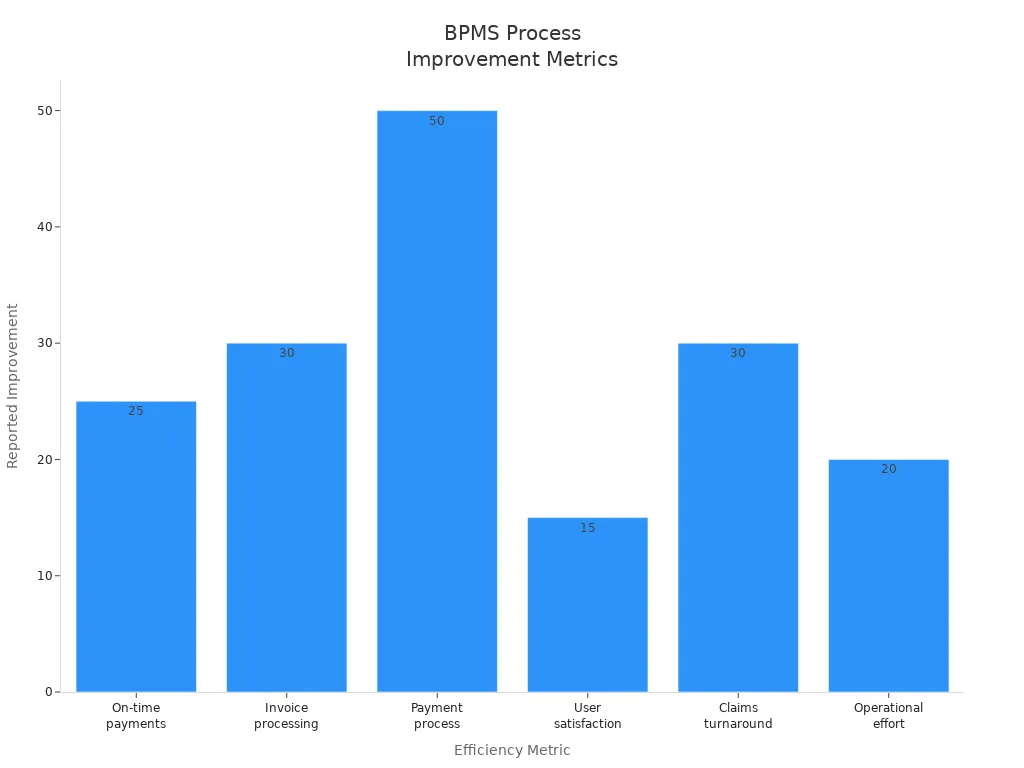
Efficiency metrics also show strong improvements:
Efficiency Metric | Reported Improvement |
|---|---|
On-time payments improvement | 25% increase |
Invoice processing efficiency | 30% increase |
Payment process efficiency | 50% increase |
User satisfaction increase | 15 points |
Claims turnaround time | 30% faster |
Operational effort reduction | 20% less |
Callout: Optimization helps organizations achieve lasting improvements in productivity and satisfaction.
BPM Lifecycle Overview
The BPM lifecycle includes five stages:
Design: Understand current processes and develop improvement plans.
Model: Visualize and plan changes.
Execute: Implement the planned processes.
Monitor: Track effectiveness using metrics and KPIs.
Optimize: Continuously improve processes for better results.
Each stage helps teams work smarter, reduce manual tasks, and achieve better outcomes.
Simplifying Daily Tasks
Modern workplaces face many repetitive tasks that slow down productivity. A Business Process Management System helps organizations automate these tasks, making daily work easier for everyone.
Workflow Automation
Workflow automation uses technology to handle routine tasks. Employees no longer need to spend hours on manual processes. Automation tools follow set rules and complete tasks quickly and accurately.
Reducing Manual Entry
Manual data entry often leads to mistakes and wasted time. Automation reduces these problems by handling repetitive work.
Workflow automation is at the heart of BPMS, helping an organization’s workflow define, map, and automate processes their workflows automatically. Automated triggers based on defined business rules and a dedicated workflow engine ensure process execution is efficient without manual intervention.
Automating repetitive tasks saves time.
Enhances employee productivity by reducing mundane workloads.
BPMS enhances process consistency by minimizing errors. Automated systems follow predefined workflows, ensuring tasks are completed accurately and uniformly. For instance, ERP systems validate data entries in real-time, flagging inconsistencies before they progress.
Removing Bottlenecks
Bottlenecks slow down business operations and frustrate employees. BPMS identifies and removes these obstacles, allowing work to flow smoothly.
Intel achieved a significant reduction in order cycle time and inventory levels through BPM solutions.
Organizations report reduced error rates and faster cycle times after implementing BPMS.
BPMS enhances efficiency by automating processes.
It provides real-time monitoring, allowing for immediate adjustments to workflows.
The tools identify bottlenecks and streamline operations, improving overall productivity.
Up to 69% of routine work in the BPM domain may be automated by the end of 2024. This high level of automation frees employees to focus on more valuable tasks.
Task Tracking and Alerts
BPMS offers advanced task tracking and alert features. These tools help employees stay organized and ensure nothing falls through the cracks.
Feature | Impact on Productivity |
|---|---|
Streamlined Deadline Tracking | Reduces time and effort for tracking deadlines, ensuring important tasks are completed on time. |
Enhanced Task Management | Automates task allocation and follow-up, improving workflow efficiency and accountability. |
Improved Communication | Centralizes task management, reducing the need for lengthy email chains and manual follow-ups. |
Employees receive automatic notifications about upcoming deadlines and task updates. This system keeps everyone informed and reduces the risk of missed work.
Streamlined Approvals
Approvals often slow down business processes. BPMS streamlines approvals by automating requests and routing them to the right people.
Implementing a Business Process Management System brings numerous benefits, including enhanced efficiency, cost reduction, and improved compliance and visibility. BPMS optimizes business processes, leading to higher productivity, better customer service, and improved organizational performance.
BPMS significantly enhances company efficiency by automating tasks, which reduces errors and increases productivity. Automating manual tasks allows employees to focus on more complex tasks requiring critical thinking, leading to more effective performance.
BPMS automates and analyzes business processes to improve efficiency and reduce costs. Nutrient Workflow uses BPMS principles to help organizations automate approvals, requests, and multistep workflows.
Tip: Streamlined approvals mean faster decisions and fewer delays, helping teams deliver results quickly.
By simplifying daily tasks, BPMS creates a more productive and less stressful work environment for everyone.
Employee Benefits

Less Manual Work
Employees often spend hours on repetitive tasks. A Business Process Management System helps them work more efficiently by automating many of these activities. Automation handles high-volume tasks, such as data entry and document processing. Employees can focus on more important work instead of routine chores.
Task routing and notifications keep processes moving without manual intervention.
Digitized forms and documentation reduce paper use and manual data entry.
Bottlenecks and redundancies disappear as routine tasks become automated.
Employees gain more time for creative and strategic work when automation takes over routine tasks.
Fewer Errors
Mistakes can cause delays and frustration in any workplace. A Business Process Management System reduces errors by making processes clearer and more reliable. In healthcare, BPMS minimizes mistakes in medicine allocation and appointment scheduling. Patients receive timely and accurate care because the system tracks every step.
Effective BPM practices lower the chances of errors. They define responsibilities for each stakeholder, which makes accountability and traceability easier. When everyone knows their role, mistakes become less common and easier to fix.
Clear processes and defined roles help teams avoid costly errors.
Better Collaboration
Collaboration improves when employees use a Business Process Management System. Teams share information easily and communicate more effectively. The system connects departments and keeps everyone updated on task progress.
Collaboration Feature | Benefit |
|---|---|
Shared dashboards | Teams see real-time updates |
Automated notifications | Everyone stays informed |
Centralized documentation | Easy access to important files |
Employees work together on projects without confusion. They see what needs to be done and who is responsible. This leads to faster results and a more positive work environment.
😊 Teams achieve more when they collaborate using clear and connected processes.
Manager and Team Benefits
Real-Time Visibility
Managers and teams need clear information to guide their actions. A Business Process Management System (BPMS) provides real-time visibility into every process. This transparency helps everyone see what is happening at each stage of a workflow. Teams can spot delays, track progress, and respond to changes quickly.
The table below highlights how BPMS features support real-time visibility:
Feature | Benefit |
|---|---|
Real-time data analytics | Enables informed decision-making with actionable insights from continuously processed data. |
Process monitoring | Tracks workflows and KPIs in real time, allowing teams to identify trends and address issues. |
Communication tools | Ensures instant updates and notifications, keeping teams aligned and responsive to changes. |
Tip: Real-time visibility helps managers and teams stay proactive instead of reactive.
Faster Decisions
BPMS empowers managers and teams to make faster decisions. The system continuously monitors and optimizes business processes. This ongoing oversight allows organizations to identify bottlenecks and inefficiencies as soon as they appear. Teams can solve problems quickly and adjust their approach without waiting for lengthy reports or meetings. As a result, decision-making becomes more agile and responsive to business needs.
Managers who use BPMS can act on up-to-date information, which leads to better outcomes and less wasted time.
Performance Metrics
BPMS tracks key performance metrics that help managers and teams measure success. These metrics provide valuable feedback and guide future improvements. By monitoring these indicators, organizations can see where they excel and where they need to improve.
Common performance metrics tracked in BPMS include:
Cost Savings: Reductions in labor costs and operational expenses lead to lower overall expenses.
Time Efficiency: Improvements in cycle time and throughput result in faster delivery of services.
Revenue Growth: Increases in sales and customer satisfaction contribute to higher income.
Quality Improvement: Fewer errors and complaints enhance customer satisfaction.
Compliance & Risk Management: Better audit readiness and fewer violations reduce penalties.
Tracking these metrics helps teams set clear goals and measure progress over time. Managers can use this data to reward high performance and address areas that need attention.
BPMS gives managers and teams the tools they need to work smarter. With real-time visibility, faster decisions, and clear performance metrics, organizations can achieve better results and create a more efficient workplace.
Business Process Management System in Action
A Business Process Management System transforms daily operations for systems and teams across many industries. The following examples show how organizations use these systems to make work easier and more efficient.
Employee Onboarding
Systems and teams in HR and IT departments often face challenges when onboarding new employees. Manual processes can slow down access to resources and delay productivity. With a Business Process Management System, teams automate the distribution of necessary documentation and information. New hires receive all required materials automatically, which streamlines their onboarding experience. This automation reduces the need for human input and enhances overall efficiency.
HR and IT teams use workflow automation to deliver onboarding documents.
The process complexity is medium, with a typical onboarding time of 3–6 weeks.
Tools such as HRIS workflow and IAM automation help track time-to-access and onboarding duration.
Teams benefit from faster onboarding, fewer errors, and improved compliance with company policies.
Customer Requests
Handling customer requests can involve multiple steps and approvals. Systems and teams use Business Process Management Systems to automate these workflows. The system provides drag-and-drop process design, automated routing, and real-time tracking. Analytics dashboards help teams monitor progress and identify bottlenecks.
Approvals and requests move through automated workflows, reducing manual effort.
Softbank Telecom replaced spreadsheets with a BPMS, achieving seamless integration and mobile approvals.
Davenport University automated student requisitions, which reduced turnaround times.
As a result, cycle times decrease, defect rates drop, and productivity improves. Employees focus on high-value activities, and customer satisfaction rises due to faster service delivery. Cost efficiency also increases as resources are used more effectively.
Expense Approvals
Expense approval workflows often require coordination between different systems and teams. A Business Process Management System streamlines these processes by automating approval routing and integrating with project budgets. The following table highlights key features and benefits:
Feature | Benefit |
|---|---|
Automation | Reduces cycle times and minimizes errors in expense approvals. |
Integration | Connects various systems (ERPs, CRMs) for seamless data flow. |
Real-time monitoring | Ensures consistent approvals and tracks performance metrics. |
Visual process modeling | Allows teams to iterate safely on approval processes. |
Human task management | Provides well-designed inboxes and SLAs for better task handling. |
Business rules management | Encodes policies to ensure compliance in expense approvals. |
Analytics | Tracks throughput, aging, and bottlenecks in the approval process. |
Teams can set custom approval routing based on thresholds. Expenses under certain amounts may be auto-approved, while integration with project budgets ensures financial control. Real-time monitoring and analytics help teams identify and resolve bottlenecks quickly.
Teams that use these systems experience faster approvals, fewer errors, and better compliance with company policies.
These real-world examples show how systems and teams use a Business Process Management System to simplify complex workflows, improve accuracy, and boost productivity.
Getting Started with BPMS
Assessing Needs
Organizations should begin their BPMS journey by carefully assessing their unique requirements. This step ensures the chosen system aligns with business goals and supports daily operations. A structured needs assessment helps teams identify what features matter most and how the BPMS will fit into existing workflows.
A recommended approach includes the following steps:
Understand the organization’s specific requirements and challenges.
Align the BPMS selection with overall business objectives.
Evaluate how well the system can model business goals and processes.
Assess the ability to measure and optimize processes for better outcomes.
Ensure the system supports real-time monitoring and performance tracking.
Confirm that internal workflows, including approval steps, are supported.
Facilitate communication and data sharing across departments.
Provide collaboration tools for employees and stakeholders.
Check for flexibility and scalability to adapt to future needs.
Identify current bottlenecks and look for ways to improve efficiency.
Support mobile access for employees who work remotely or on the go.
Ensure the user interface is intuitive so employees can adopt the system easily.
Tip: A thorough needs assessment helps organizations avoid costly mistakes and ensures the BPMS delivers real value.
Choosing a Solution
Selecting the right BPMS requires careful consideration of several criteria. Teams should look for a solution that not only meets current needs but also supports future growth. The following factors can guide the decision-making process:
Identify and address bottlenecks in business processes.
Support mobile access for employees who need flexibility.
Offer an intuitive user interface for quick adoption.
Provide workflow automation, analytics tools, and integration with other business systems.
A well-chosen BPMS will streamline operations, improve communication, and make it easier for employees to adapt to new processes.
Note: Choosing a system with strong integration capabilities ensures smooth data flow between departments.
Implementation Steps
After selecting a BPMS, organizations should follow best practices for a successful rollout. A clear implementation plan helps teams avoid disruptions and achieve desired outcomes.
Assess existing business processes to find inefficiencies and improvement opportunities.
Set clear, measurable goals that align with the organization’s strategy.
Design and implement the BPMS, using technology and automation to enhance workflows.
Continuously monitor, measure, and optimize processes with key performance indicators (KPIs).
Teams that follow these steps can expect smoother transitions, better process visibility, and ongoing improvements in efficiency.
🚀 Continuous monitoring and optimization keep business processes effective and responsive to change.
Training and Adoption
Training and adoption play a crucial role in the success of any Business Process Management System (BPMS). Employees need the right skills and confidence to use new digital tools effectively. Organizations that invest in strong training programs see higher adoption rates and better results from their BPMS.
A well-structured training plan helps employees understand both the system and the processes it supports. Teams benefit from a mix of learning methods. The most effective approaches include:
Comprehensive training programs that cover all key features and workflows.
Ongoing training sessions to keep employees updated on new features and process changes.
Learning by doing, where employees practice tasks in real-time with practical examples.
Employees who learn by doing often gain confidence faster and remember new skills longer.
Managers should encourage employees to ask questions and share feedback during training. This open communication helps trainers address concerns and adapt the program to meet team needs. Many organizations use a combination of classroom sessions, online modules, and hands-on workshops. This variety ensures that all learning styles are supported.
A sample training plan for BPMS adoption might look like this:
Training Method | Description | Benefit |
|---|---|---|
Classroom Sessions | Instructor-led lessons on BPMS basics | Builds foundational knowledge |
Online Modules | Self-paced digital courses and tutorials | Flexible learning options |
Hands-on Workshops | Real-time practice with actual workflows | Reinforces practical skills |
Refresher Sessions | Regular updates on new features and best practices | Keeps skills current |
Ongoing support is just as important as initial training. Employees need access to resources such as user guides, FAQs, and help desks. Peer mentoring can also help new users feel comfortable with the system.
Regular check-ins and feedback sessions help teams identify challenges early and adjust training as needed.
Successful adoption depends on leadership support. Managers should set clear expectations and recognize employees who embrace the new system. When everyone understands the benefits and feels supported, the transition to BPMS becomes much smoother.
A strong focus on training and adoption ensures that employees use BPMS confidently and effectively. This leads to better process outcomes, higher productivity, and a more positive workplace experience.
Overcoming Challenges
Implementing a Business Process Management System (BPMS) brings many benefits, but organizations often face several challenges during adoption. Addressing these obstacles helps teams achieve smoother transitions and better results.
Change Management
Change can create uncertainty for employees. Many people feel comfortable with familiar routines and may resist new systems. Organizations often encounter resistance to change, siloed departments, and undefined ownership during BPMS implementation. Leaders can overcome these issues by engaging stakeholders early and fostering collaboration across teams. Assigning clear process owners ensures everyone knows their responsibilities.
Challenge Category | Typical Challenges | How They Are Addressed |
|---|---|---|
Organizational | Resistance to change, siloed departments, limited resources, undefined ownership | Engage stakeholders, foster collaboration, assign clear process owners |
Strategic | Lack of executive support, unclear objectives, difficulty measuring success | Link BPM initiatives to business goals, secure executive sponsorship, define clear objectives |
Technical | Integration with legacy systems, poor data quality, over-customization, skills gaps | Ensure seamless integration, improve data quality, avoid excessive customization, provide training |
Tip: Open communication and leadership involvement help reduce resistance and build trust during transitions.
Ensuring Ease of Use
A BPMS should be easy for everyone to use, not just IT professionals. Complicated systems can discourage adoption and slow down progress. Teams benefit from intuitive interfaces and clear instructions. Training programs play a key role in helping employees gain confidence with new tools. Ongoing support, such as user guides and help desks, ensures that employees can solve problems quickly.
Simple dashboards and drag-and-drop features make processes easier to manage.
Regular feedback sessions allow teams to share concerns and suggest improvements.
Training helps bridge skills gaps and encourages active participation.
😊 When employees find a system easy to use, they are more likely to embrace it and use it effectively.
Continuous Improvement
Continuous improvement keeps business processes efficient and relevant. Teams should monitor workflows and collect feedback to identify areas for enhancement. Regular reviews help organizations adapt to changes in business goals or technology. By measuring success with clear objectives and key performance indicators, teams can track progress and celebrate achievements.
Set measurable goals for each process.
Use real-time data to spot inefficiencies.
Adjust workflows based on feedback and performance metrics.
Continuous improvement ensures that BPMS remains valuable and supports long-term success.
Organizations that address change management, focus on ease of use, and commit to ongoing improvement can overcome common BPMS challenges. These strategies help teams unlock the full potential of their business process management system.
A Business Process Management System helps teams work efficiently by automating repetitive tasks and removing obstacles in workflows. Employees experience higher job satisfaction as they focus on meaningful work. Organizations that use BPM see efficiency gains of up to 30%. Continuous monitoring allows managers to track progress and act on employee feedback. Streamlined processes reduce waste and boost productivity. Those interested in learning more can reach out for guidance on improving workplace efficiency.
FAQ
What is a Business Process Management System (BPMS)?
A BPMS is software that helps organizations design, automate, monitor, and improve business processes. It makes daily work easier by reducing manual tasks and increasing efficiency.
Who can use a BPMS?
Anyone in an organization can use a BPMS. Employees, managers, and IT staff all benefit from its features. The system is user-friendly and does not require advanced technical skills.
How does BPMS improve teamwork?
BPMS connects teams by sharing information and automating communication. Employees see task progress in real time. This transparency helps everyone work together and reach goals faster.
Can BPMS integrate with other business tools?
Yes. Most BPMS solutions connect with tools like CRM, ERP, and HRM systems. Integration ensures smooth data flow and reduces the need for manual updates.
Is BPMS secure?
BPMS platforms use strong security features. They protect sensitive data with encryption, access controls, and regular audits. Organizations can trust BPMS to keep information safe.
How long does it take to implement a BPMS?
Implementation time varies. Small organizations may set up a BPMS in a few weeks. Larger companies may need several months. Planning and training help speed up the process.
What are common challenges when adopting BPMS?
Organizations may face resistance to change, integration issues, or training needs. Clear communication, leadership support, and ongoing training help teams overcome these challenges.
Does BPMS require coding skills?
Most BPMS platforms offer drag-and-drop tools. Employees can design and update workflows without writing code. This makes BPMS accessible to everyone.


