Business Automation makes work easier for everyone

Business automation transforms daily operations for employees by making tasks smoother and more efficient. Many organizations see fewer mistakes and faster completion of routine jobs. Almost 90% of IT professionals notice business growth after they adopt automation. Customers receive timely responses, and clients experience better service. According to recent surveys, most office workers believe automation will improve job satisfaction. Automation helps teams use resources wisely, allowing people to focus on meaningful work.
Key Takeaways
Business automation streamlines daily tasks, making work easier and more efficient for employees.
Automation reduces errors and improves accuracy, leading to better compliance and quality in business processes.
Implementing automation can save employees significant time, allowing them to focus on more meaningful and strategic work.
Automation enhances collaboration by providing shared tools and real-time updates, improving communication among team members.
Choosing user-friendly automation tools helps teams adopt new technology with confidence and ease.
Setting clear goals and tracking progress ensures successful automation efforts and continuous improvement.
Involving team members in the automation process fosters engagement and ensures that solutions meet everyone's needs.
Automation supports business growth by freeing up time for owners to focus on strategy and customer relationships.
Business Automation Overview
What Is Business Automation?
Automation is defined as "the partial or full execution of a task by a computer that has been previously carried out by a human."
Business Process Automation refers to the use of technology to streamline and automate business processes, ensuring efficiency, control, resource management, and visibility throughout the organization.
Business automation uses software to manage repetitive tasks and streamline workflows. Companies rely on it to handle jobs that once required manual effort. This approach helps teams save time and reduce mistakes. Many organizations use business automation to improve how they work every day.
Some of the most common software tools for business automation in small and medium enterprises include:
Claromentis: An integrated digital workplace solution with a no-code interface for automating complex processes.
Automation Anywhere: A cloud-native, AI-powered tool for automating inefficient processes at scale.
UiPath: Focuses on identifying and transforming inefficient processes through robotic process automation.
Microsoft Power Automate: Integrates well with Microsoft applications, offering easy-to-use automation solutions.
Zapier: A low-code platform that connects web applications to build automated workflows.
Kissflow: Provides no-code and low-code automation capabilities for various teams.
Pega Platform: Automates repetitive tasks and optimizes processes with flexibility.
Appian: An end-to-end automation platform with built-in intelligence capabilities.
Bizagi: Combines automation with process management and low-code apps.
Nintex Process Platform: Offers AI-powered automation capabilities for cloud or in-house deployment.
Core Purpose and Value
The main goal of business automation is to make work easier and more reliable. Organizations use automation to improve efficiency, accuracy, and resource management. The table below shows the primary objectives of business automation in modern organizations:
Objective | Description |
|---|---|
Improve Operational Efficiency | Automating manual processes to eliminate errors and increase productivity, allowing focus on strategic tasks. |
Enhance Accuracy and Consistency | Ensuring tasks are performed accurately and consistently, reducing compliance risks and improving quality. |
Optimize Resource Allocation | Allocating resources effectively towards value-added activities, driving innovation and maximizing utilization. |
Cost Reduction | Lowering labor costs and minimizing resource needs, directly impacting profitability. |
Improved Scalability and Agility | Enabling businesses to adapt quickly to market changes and handle increased workloads efficiently. |
Types of Automation
Business automation comes in several forms. Each type serves a different purpose and fits different needs.
Process Automation
Process automation integrates applications to enhance efficiency and value across business operations. It often covers entire workflows, such as order processing or employee onboarding. Many companies use process automation to connect different departments and ensure smooth operations.
Task Automation
Task automation focuses on individual, repetitive tasks. Examples include scheduling meetings, sending reminders, or updating records. Tools like Zapier and Microsoft Power Automate help teams automate these small but time-consuming jobs.
Robotic Process Automation (RPA)
Robotic Process Automation (RPA) automates simple, rule-based tasks. RPA tools, such as UiPath and Automation Anywhere, handle jobs like processing refunds or creating chatbots. RPA works best for tasks that follow clear steps and do not require human judgment.
Business automation continues to evolve. Companies now use intelligent automation, business process management automation, and process mining to analyze and improve workflows. These advancements help organizations stay competitive and adapt to changing needs.
Business Automation Benefits
Reducing Repetitive Work
Modern workplaces often struggle with repetitive and monotonous tasks. Business automation helps by shifting these tasks to software, which leads to a better customer experience, fewer errors, and less stress for teams. Employees can focus on meaningful work instead of spending hours on routine activities.
Automation reduces repetitive and monotonous tasks by delegating them to software, leading to improved customer experience, reduced error rates, enhanced compliance, and lower stress for teams.
Thoughtful incorporation of automation into system design enables organizations, particularly small and midsize businesses, to scale productivity more efficiently without the need for immediate resource expansion.
Data Entry Automation
Manual data entry can consume a significant amount of time and often leads to mistakes. By automating data entry, companies reclaim valuable hours and improve accuracy.
Employees can save approximately 240 hours per year through task automation, which is equivalent to six 40-hour work weeks.
Executives estimate that automation could save up to 360 hours annually, translating to nine full weeks of productive time per employee.
Automation reduces manual data entry work by 80%, reclaiming significant hours for higher-value tasks.
Scheduling Tasks
Scheduling meetings, reminders, and follow-ups can take up a large portion of the workday. Automation tools handle these tasks quickly and consistently. Teams benefit from reliable scheduling, which ensures that important deadlines and appointments are never missed.
Minimizing Errors
Mistakes in business processes can lead to lost revenue, compliance issues, and damaged reputations. Business automation addresses these risks by standardizing how tasks are performed and introducing automated checks.
Standardized Processes
Standardized processes minimize the risk of mistakes by providing clear instructions and guidelines. In industries such as healthcare, finance, and aviation, where errors can have severe consequences, standardized procedures are vital for ensuring safety and compliance. Standardization focuses on eliminating unnecessary variations in how work gets done, creating predictable outcomes and reducing errors that stem from inconsistent execution. Standardized processes also provide clear responsibilities and expectations for employees. When workflows are documented, it becomes easier to track accountability, measure performance, and identify areas for improvement.
Automated Checks
Automated systems can catch errors before they become problems. The following table shows how automation reduces error rates in financial processes:
Method | Error Rate Reduction |
|---|---|
Traditional Methods | 2% - 5% |
Automated Systems | Up to 98% |
Automated Reconciliation | Nearly 95% |
Automated checks ensure that data is accurate and consistent, which helps organizations avoid costly mistakes.
Boosting Productivity
Business automation increases productivity by allowing employees to complete tasks faster and focus on more important work. Many organizations report significant improvements after adopting automation tools.
Faster Task Completion
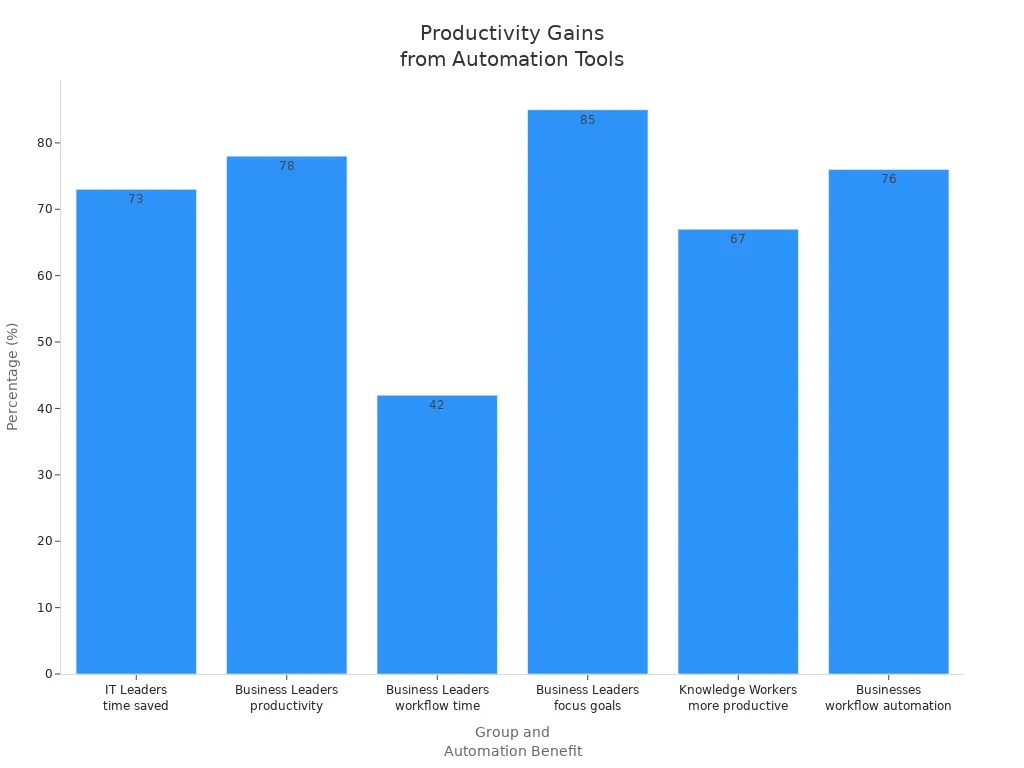
Automation speeds up routine processes, which means teams can accomplish more in less time. The following chart illustrates how automation impacts productivity across different roles:
Statistic | Description |
|---|---|
73% of IT Leaders | Believe automation saves about 50% of time spent on manual tasks. |
78% of Business Leaders | Report that automation enhances overall productivity. |
42% of Business Leaders | Agree that workflow automation saves time and allows focus on strategic tasks. |
85% of Business Leaders | Believe automation allows employees to focus on important goals. |
2 out of 3 Knowledge Workers | Say automation has helped them be more productive. |
76% of Businesses | Use automation to standardize or automate daily workflows. |
Freeing Up Time
Automation enhances workplace efficiency by removing tedious manual tasks, which allows employees to concentrate on more strategic and creative endeavors. For instance, generative AI tools can boost task throughput by an average of 66%, and McKinsey predicts that by 2030, generative AI could free up 30% of workers' time. This shift enables professionals to engage in complex problem-solving and innovation, ultimately driving organizational success.
Business automation not only streamlines daily operations but also empowers teams to achieve more with less effort. As organizations continue to adopt these tools, they see measurable improvements in accuracy, productivity, and employee satisfaction.
Improving Collaboration
Automation does more than speed up tasks. It also brings people together and helps teams work as one unit. When businesses use automation, they often see better teamwork and smoother communication. Employees can share information quickly and stay updated on important changes.
Shared Tools
Shared tools play a key role in business automation. These platforms bring all team members onto the same page. They centralize communication, feedback, and project details in one place. This setup makes it easier for everyone to find what they need and stay organized.
Client collaboration tools help businesses work closely with clients in an organized way.
These tools centralize communication, feedback, and project details into one platform.
They streamline workflows and help teams meet deadlines.
Collaboration tools improve communication among team members.
They support remote teams and make it easier for people to work together from different locations.
AI-powered tools can boost creativity and speed up communication.
Shared tools remove confusion and reduce the risk of missed messages. Teams can track progress, assign tasks, and share updates without switching between different apps. This approach saves time and keeps everyone focused on their goals.
Real-Time Updates
Real-time updates keep everyone informed as soon as something changes. Automated systems send instant notifications, so employees do not have to wait for emails or meetings to learn about new developments. This immediate flow of information helps teams respond quickly and stay aligned.
HR chatbots act as an always-on channel for communication. Employees can voice their concerns at any time, which increases engagement.
Chatbots can prompt employees to rate their feelings with simple emojis. This makes feedback collection casual and intuitive.
Employees who receive AI-personalized communications are 31% more likely to take recommended actions compared to those who get generic messages.
AI coordinates personalized experiences across different communication channels. This ensures messages are consistent and tailored to each employee's needs.
Real-time updates help teams avoid delays and misunderstandings. Everyone knows what is happening, which builds trust and improves teamwork. Automated alerts and personalized messages keep employees engaged and motivated.
Business automation strengthens collaboration by giving teams the right tools and timely information. As a result, employees can work together more effectively, no matter where they are.
Business Automation in Action

HR Automation
Onboarding
Many organizations use automation to improve the onboarding process for new employees. Automated systems provide new hires with access to necessary applications and resources on their first day. This approach ensures a smooth start and reduces manual work for HR teams. Systems and teams benefit from triggered workflows that deliver welcome emails, training schedules, and required documents automatically. The table below highlights impactful examples of HR automation in large organizations:
Example | Description |
|---|---|
Employee Referrals | Chatbots in business platforms allow employees to refer candidates and track their status. |
Employee Onboarding | Automated workflows provide new hires with applications and resources on their first day. |
Employee Offboarding | Automation revokes access to company devices and systems when an employee leaves. |
Automated onboarding helps clients at systems and teams achieve faster integration for new employees, making the process more consistent and less stressful.
Payroll
Payroll automation transforms how HR departments handle employee payments. Automated payroll systems calculate wages, deduct taxes, and process payments with minimal human input. This reduces errors and speeds up the payroll cycle. The following table outlines the main benefits of payroll automation:
Benefit | Description |
|---|---|
Reduced Processing Time | Payroll cycles compress from days to hours, speeding up the process. |
Enhanced Accuracy | Automated calculations minimize errors, leading to reliable payroll results. |
Improved Compliance Readiness | Automation supports compliance with regulations, reducing risk. |
Systems and teams that use payroll automation experience fewer mistakes and spend less time on repetitive calculations. Clients at these organizations enjoy timely and accurate payments.
Finance Automation
Invoice Processing
Finance teams often face challenges with slow and error-prone invoice processing. Automation addresses these issues by capturing data, validating information, and routing invoices for approval. This leads to faster processing and fewer mistakes. Key benefits include:
Enhanced accuracy through automated data validation.
Better cash flow management with real-time insights.
Strengthened vendor relationships due to timely payments.
Clients at systems and teams can complete tasks that once took weeks in just hours or minutes, improving both internal operations and external partnerships.
Expense Tracking
Automated expense tracking systems help organizations control spending and reduce fraud. These systems flag expenses that exceed policy limits and use AI to detect unusual patterns. Integrated platforms connect travel bookings and expense reports, making it easier to monitor costs. The main advantages include:
Lower risk of human error and intentional fraud.
Enforced policy compliance by flagging out-of-policy expenses.
Detection of anomalies in spending patterns.
Real-time control over spending and fewer discrepancies.
Systems and teams that adopt automated expense tracking gain better visibility and control, helping clients maintain compliance and reduce unnecessary costs.
Customer Service Automation
Chatbots
Chatbots have become essential tools for customer service teams. They handle a high volume of inquiries, provide instant responses, and remain available 24/7. While chatbots manage routine questions efficiently, human agents focus on complex issues that require empathy and problem-solving. A hybrid approach allows chatbots to resolve about 80% of common requests, freeing up staff for more challenging tasks.
Automated Follow-Ups
Automated follow-up systems send timely messages to customers after support interactions. These systems improve response times and ensure customers feel valued. Automation increases first contact resolution rates and allows teams to process more requests efficiently. Customers receive consistent and accurate information, which builds trust and satisfaction.
Business Automation empowers systems and teams to deliver better results for clients by streamlining HR, finance, and customer service processes. Organizations see faster workflows, fewer errors, and improved collaboration across departments.
Sales & Marketing Automation
Sales and marketing teams rely on automation to reach more customers and close deals faster. Automation tools help these teams manage campaigns, track leads, and measure results with greater accuracy. By using these solutions, organizations can improve both efficiency and performance.
Email Campaigns
Automated email campaigns allow marketing teams to send the right message to the right person at the right time. These systems use rules and triggers to deliver emails based on customer actions, such as signing up for a newsletter or clicking a link. This approach keeps communication timely and relevant.
Modern email automation platforms offer several key features:
Centralized CRM integration brings marketing and sales teams together in one workspace. Teams can plan campaigns, review content, and monitor results without switching tools.
AI-supported content creation helps teams write better subject lines and messages. AI can suggest improvements, making emails more engaging.
Dynamic segmentation sorts contacts into groups based on interests or behaviors. This allows for targeted messages that speak directly to each group.
Real-time performance tracking gives instant feedback on how campaigns perform. Teams can see open rates, clicks, and other metrics on dashboards.
Automation rules also send messages at important moments, such as when a lead becomes inactive or reaches a new stage in the sales process. These workflows support onboarding, nurture journeys, and renewal reminders, which help maintain customer engagement.
The table below highlights how automated email campaigns improve engagement and sales performance:
Feature | Description |
|---|---|
Centralized CRM Integration | Teams manage campaigns and collaborate in a shared workspace. |
AI-Supported Content Creation | AI helps generate subject lines and refine tone for effective emails. |
Dynamic Segmentation | Targeted messaging based on customer attributes increases engagement. |
Real-Time Performance Tracking | Dashboards provide instant updates on campaign results, allowing quick strategy adjustments. |
Lead Management
Lead management automation tracks every step of the customer journey, from first contact to closed deal. These tools capture new leads, score them based on interest, and assign them to the right salespeople. Automation ensures that no opportunity slips through the cracks.
Sales teams use automation to:
Respond to leads quickly, often within minutes. Fast responses can triple conversion rates.
Score leads automatically, so sales reps focus on the most promising prospects.
Track follow-ups and engagement, making sure every lead receives consistent attention.
Analyze the sales funnel to spot where leads move forward or get stuck.
The following table shows key metrics that sales and marketing automation can measure:
Metric Type | Description |
|---|---|
Lead volume metrics | Sources, conversion rates, qualification percentages. |
Performance indicators | Response times, follow-up rates, engagement scores. |
Revenue attribution | Identifies which campaigns and channels drive closed deals. |
Team productivity | Activities per rep, conversion rates by owner. |
Funnel analysis | Shows where leads progress smoothly and where they stall. |
Cohort analysis | Compares performance across different lead segments. |
Attribution reporting | Connects marketing activities to revenue outcomes. |
Automated lead scoring | Provides an objective definition of “sales-ready” leads. |
Response consistency | Ensures quality responses regardless of lead volume. |
Speed of response | Leads contacted within five minutes convert at three times the rate. |
Automated lead management helps sales teams work smarter, not harder. By tracking every interaction and measuring results, organizations can improve conversion rates and grow revenue.
Sales and marketing automation gives teams the tools to reach more prospects, personalize communication, and close deals faster. These systems make daily work easier and more productive for everyone involved.
Role-Based Benefits
For Employees
Less Stress
Automation reduces the burden of repetitive and tedious tasks for employees. When software handles routine work, employees experience less stress and frustration. They no longer need to worry about manual data entry or tracking endless spreadsheets. Automated systems help prevent burnout by creating a more balanced workload. Employees can rely on consistent processes, which leads to a calmer and more predictable work environment.
Automated workflows also minimize the risk of errors, so employees feel more confident in their daily responsibilities. This sense of reliability supports a healthier workplace and improves overall job satisfaction.
More Focus
Automation gives employees the freedom to concentrate on tasks that require creativity and problem-solving. By shifting repetitive work to technology, employees can focus on projects that add real value to the organization.
Automation reduces the time spent on repetitive tasks, allowing employees to engage in more value-added activities.
It streamlines workflows and enhances efficiency, enabling employees to utilize their skills in a smarter and more strategic manner.
By deploying automation technologies, employees can focus on complex activities rather than menial tasks.
Workforce automation allows employees to work on fewer repetitive tasks.
It gives employees more time to focus on valuable and strategic projects.
This shift enhances overall employee satisfaction and productivity.
Employees who spend more time on meaningful work often feel more motivated and engaged. Automation supports professional growth by allowing individuals to develop new skills and take on challenging assignments.
For Managers
Better Oversight
Managers benefit from automation through improved visibility and control over business processes. Automated systems provide real-time data and clear audit trails, making it easier to monitor progress and ensure compliance. Managers can quickly identify bottlenecks and address issues before they escalate. This level of oversight helps maintain high standards and supports better decision-making.
Easier Reporting
Automation simplifies reporting by collecting and organizing data automatically. Managers no longer need to gather information manually or worry about missing details. Automated reports are accurate and up-to-date, which saves time and reduces the risk of mistakes.
Benefit | Description |
|---|---|
Quick approvals | Automation allows for faster approvals throughout the reporting process, ensuring efficiency. |
Higher efficiency | Reduces manual work, enabling finance experts to focus on strategic tasks rather than repetitive ones. |
Reduced errors | Ensures data integrity and minimizes human error in financial reporting. |
More transparency | Provides detailed audit trails, making it easy to trace transactions and changes. |
Fraud prevention | Digital processes with automated controls make fraud much more difficult. |
Improved controls | Enhances accounts payable controls through custom user roles and approval policies. |
Automation gives managers the tools to lead teams more effectively and make informed decisions with confidence.
For Business Owners
Cost Savings
Business owners see significant cost savings when they implement automation. Automated processes lower labor costs by reducing the need for manual work. Organizations can operate efficiently with smaller teams or reassign staff to more strategic roles. Automation also minimizes costly errors, such as billing mistakes or compliance issues, which improves financial sustainability.
Automation leads to an average ROI of 240% within months of implementation.
Organizations can reduce operational costs by up to 90% in areas like logistics and administration.
Automation allows businesses to scale without proportional increases in staff, enhancing productivity.
Growth Potential
Automation supports business growth by freeing up time for owners to focus on strategy and customer relationships. Automated systems handle repetitive tasks, so leaders can spend more time making important decisions. Businesses can scale operations and handle increased workloads without hiring more staff. This flexibility helps organizations adapt to new opportunities and remain competitive in changing markets.
Automation has become a core operational strategy for businesses. It enables entrepreneurs to reclaim time, reduce errors, and enhance scalability, all of which are crucial for long-term growth.
Common Concerns
Job Security
Automation often raises questions about job security. Many workers worry that technology will replace traditional roles. This concern appears in many industries, especially where repetitive tasks are common. As automation becomes more common, employees must adapt to new ways of working.
Automation as a Tool
Automation should be seen as a tool that supports workers, not as a replacement for them. People bring unique strengths to the workplace. Skills like emotional intelligence and creative thinking remain essential and cannot be automated. Workers who focus on these human strengths stay valuable in any job market. Upskilling also helps employees remain relevant as technology evolves. Many organizations encourage their teams to learn new skills and take on more meaningful work.
Automation creates opportunities for workers to grow. By learning new skills, employees can move into roles that require problem-solving and creativity.
Automation raises concerns about job security as it replaces traditional roles.
Workers need to upskill to stay relevant in an evolving job market.
Emotional intelligence and creative thinking are essential human strengths that cannot be automated.
Complexity
Some people believe automation is too complex for everyday use. They worry that only IT experts can manage automated systems. This belief can slow down adoption and make teams hesitant to try new tools.
User-Friendly Solutions
Modern automation platforms focus on simplicity. Many solutions now offer visual workflow builders and drag-and-drop interfaces. For example, Kissflow allows business users to create and manage their own automated workflows. This approach reduces the need for IT support and makes automation accessible to everyone. Workato also enables collaboration between business users and IT teams. Users can build complex workflows without writing code.
Kissflow enables business users to create and manage their own automated workflows, simplifying processes and reducing reliance on IT support.
The platform features visual workflow builders and an intuitive drag-and-drop interface, enhancing user experience and transparency in process management.
Workato facilitates collaboration between business users and IT teams, allowing for the creation of complex workflows without the need for coding.
User-friendly automation tools help teams adopt new technology with confidence. These platforms make it easy for anyone to automate tasks, regardless of technical skill.
Cost
Cost is another common concern when considering automation. Many business owners worry about the upfront investment in new technology. They may also question whether automation will deliver enough value to justify the expense.
Long-Term Savings
While automation requires an initial investment, it often leads to significant long-term savings. Automated systems reduce labor costs by handling repetitive tasks. They also minimize errors, which can save money on corrections and compliance issues. Over time, businesses see a return on investment as they operate more efficiently and scale without hiring additional staff.
Automation helps organizations save money in the long run. By streamlining processes and reducing manual work, companies can focus resources on growth and innovation.
Fairness
Benefits for All
Business automation often raises questions about fairness. Some people worry that only certain groups or departments will benefit. Others fear that automation might create gaps between teams or roles. In reality, well-designed automation can support fairness and bring advantages to everyone in an organization.
Automation tools help create equal opportunities for employees. They standardize processes, so everyone follows the same steps. This reduces favoritism and ensures that each person receives the same treatment. For example, automated approval workflows use set rules. These rules apply to all requests, which means decisions do not depend on personal preferences.
Automation helps remove bias from routine tasks. When software follows clear rules, it treats every request or action the same way.
A fair workplace also means that everyone has access to the same resources. Automation platforms often include shared dashboards, communication tools, and real-time updates. These features keep all team members informed and involved. No one gets left out because of location or work schedule.
The table below shows how automation supports fairness in different areas:
Area | How Automation Promotes Fairness |
|---|---|
Task Assignment | Distributes work evenly based on rules |
Performance Reviews | Uses objective data for evaluations |
Communication | Sends updates to everyone at the same time |
Access to Tools | Provides equal access to resources and information |
Policy Enforcement | Applies company policies consistently |
Automation also helps managers track workloads and spot imbalances. If one team member receives too many tasks, the system can alert supervisors. This allows leaders to adjust assignments and prevent burnout.
Employees in different roles benefit from automation in unique ways:
Frontline workers receive clear instructions and fewer manual tasks.
Managers gain better oversight and can make fair decisions using data.
Remote employees stay connected through automated updates and shared platforms.
New hires experience smoother onboarding with automated training and resources.
Fairness grows when everyone understands how automation works. Training and open communication help employees trust new systems. When people see that automation supports their work, they feel more included and valued.
Business automation, when used thoughtfully, creates a level playing field. It gives every employee the tools and information needed to succeed. By promoting fairness, automation helps build a stronger, more united workplace.
Getting Started

Identify Tasks to Automate
Small businesses often benefit from automation when they start with tasks that repeat frequently. Teams should observe daily routines and note activities that involve transferring data, updating records, or compiling reports. These tasks usually require the same steps each time, making them ideal candidates for automation. Employees can also review the emails they send most often. Templates can help automate these messages, saving time and reducing errors. Tasks that require actions across multiple systems, such as moving information from one platform to another, often slow down productivity. Automation can streamline these processes and improve accuracy.
Teams may find it helpful to focus on high-impact reports. Mapping the source data for these reports ensures timely and accurate information. By identifying these tasks, organizations lay the foundation for successful Business Automation.
Repetitive tasks involving data transfer
Frequently sent emails suitable for templates
Actions across multiple systems
High-impact reports with mapped source data
Choose Simple Tools
Selecting the right tools makes automation easier for everyone. Many platforms offer user-friendly interfaces with drag-and-drop features. These tools allow employees to build automated workflows without coding knowledge. Teams should look for solutions that integrate with their current systems. Compatibility reduces the learning curve and helps employees adopt new technology quickly.
A table below shows features to consider when choosing automation tools:
Feature | Benefit |
|---|---|
Drag-and-drop builder | Simplifies workflow creation |
Integration options | Connects with existing systems |
Templates | Speeds up setup |
Support resources | Provides guidance |
Teams should start with tools that solve immediate needs. Simple solutions help employees gain confidence and see quick results.
Involve Your Team
Successful automation depends on teamwork. Employees bring valuable insights about daily challenges and opportunities for improvement. Managers should encourage open discussions about which tasks cause frustration or waste time. Involving team members in the decision-making process builds trust and increases engagement.
Collaboration ensures that automation supports everyone’s needs. When employees participate, they feel ownership and are more likely to embrace new workflows.
Managers can assign roles for testing and feedback. Teams should review automated processes regularly and suggest adjustments. This approach creates a culture of continuous improvement.
For those interested in learning more about automation or seeking guidance, reaching out to experts can provide helpful support and resources.
Set Goals and Track Progress
Setting clear goals helps organizations measure the success of their automation efforts. Teams should define what they want to achieve before launching any new automated process. Goals can focus on saving time, reducing errors, or improving customer satisfaction. When teams set specific targets, they can track progress and see real results.
A simple way to set goals is to use the SMART method. SMART stands for Specific, Measurable, Achievable, Relevant, and Time-bound. This approach makes goals easier to understand and track.
SMART Criteria | Description | Example Goal |
|---|---|---|
Specific | Clear and detailed | Automate invoice approvals |
Measurable | Can be tracked with numbers | Reduce approval time by 50% |
Achievable | Realistic for the team | Use existing automation tools |
Relevant | Important to business needs | Speeds up payments to vendors |
Time-bound | Has a deadline | Complete within three months |
Teams should write down their goals and share them with everyone involved. This keeps everyone focused and motivated. Regular check-ins help teams see if they are meeting their targets. Teams can use dashboards or progress charts to visualize improvements.
Tracking progress helps teams spot problems early. If a process does not meet its goal, teams can adjust quickly.
Teams should celebrate small wins. Recognizing progress boosts morale and encourages everyone to keep improving. When teams reach a goal, they can set new targets to keep moving forward.
Learn and Adjust
Automation works best when teams treat it as an ongoing journey. After launching an automated process, teams should review the results and gather feedback. This helps them learn what works well and what needs improvement.
Teams can use these steps to learn and adjust:
Collect feedback from employees who use the automated process every day.
Review data to see if the process meets its goals.
Identify issues such as delays, errors, or confusion.
Make changes to improve the workflow.
Test updates and check if the changes solve the problem.
Continuous improvement keeps automation effective and relevant. Teams that learn from experience can adapt to new challenges.
Teams should encourage open communication. When employees share their ideas, the whole organization benefits. Regular training sessions help everyone stay up to date with new tools and features.
Automation is not a one-time project. By learning and adjusting, teams can make sure their automated processes always support business goals and employee needs.
Business Automation helps teams work smarter by reducing errors, saving time, and improving teamwork. Many organizations see better results when they automate simple tasks first. Small changes can lead to big improvements in daily work.
Less stress for employees
Faster results for managers
More growth for business owners
Embracing automation creates a workplace where everyone can succeed.
FAQ
What types of tasks can business automation handle?
Business automation manages repetitive tasks like data entry, scheduling, and invoice processing. It also supports customer service with chatbots and automates email campaigns for marketing teams.
Does automation require advanced technical skills?
Most modern automation tools use simple interfaces. Many platforms offer drag-and-drop features. Employees can often set up workflows without coding knowledge.
How does automation affect job roles?
Automation shifts focus from repetitive work to creative and strategic tasks. Employees gain time for problem-solving and skill development. Automation supports growth rather than replacing jobs.
Is business automation expensive to implement?
Initial costs vary by tool and company size. Many businesses see long-term savings through reduced labor costs and fewer errors. Some platforms offer affordable plans for small teams.
Can automation improve team collaboration?
Yes. Automation provides shared tools and real-time updates. Teams communicate better and stay organized. Everyone accesses the same information, which helps projects move forward smoothly.
What if a process changes after automation?
Teams can update automated workflows easily. Most platforms allow quick edits. Regular reviews help keep automation aligned with business needs.
How does automation help reduce errors?
Automated systems follow set rules and check for mistakes. This reduces human error and ensures consistent results. Teams trust the accuracy of automated processes.
Are automated systems secure?
Reputable automation platforms use strong security measures. They protect sensitive data with encryption and access controls. Teams should choose trusted providers and follow best practices.


