How to Automate Business Processes and Reduce Manual Work

Automate Business Processes to reduce manual work by shifting repetitive tasks to digital systems. Automated workflows speed up completion, minimize errors, and improve Business Management. Companies see process times up to 87% faster and cost reductions as high as 17%. The table below shows common impacts:
Statistic Description | Impact |
|---|---|
Cost Reduction | Up to 17% cost reduction in AR processes |
Process Speed | Up to 87% faster than manual methods |
Time Reallocation | 57% of time moves from manual tasks to strategic projects |
Overtime Reduction | Fewer overtime hours due to automation |
Increased Productivity | More work per staff member |
Optimization Steps start with analyzing, documenting, and prioritizing processes. Hiring Systems and automated customer support improve consistency and accuracy, allowing staff to focus on important tasks.
Key Takeaways
Automating business processes can speed up tasks by up to 87% and reduce costs by as much as 17%.
Start by analyzing and mapping current workflows to identify manual tasks and bottlenecks.
Focus on automating repetitive tasks that consume time and are prone to errors, such as data entry and invoice processing.
Select automation tools that fit your needs, considering features like integration capabilities and user-friendliness.
Train employees on new systems to build confidence and ensure smooth transitions to automated workflows.
Regularly monitor and optimize automated processes to maintain efficiency and adapt to changing business needs.
Use clear metrics to measure the success of automation, such as time saved, error reduction, and cost savings.
Start small with pilot projects to build momentum and confidence before scaling automation across the organization.
Identify Manual Tasks

Understanding where manual work occurs is the first step to streamlining operations. Companies that want to Automate Business Processes must begin by examining their current workflows and identifying tasks that consume time or lead to errors.
Analyze Workflows
Map Processes
Mapping processes helps organizations see every step in their workflows. Teams often use visual tools to lay out each action, decision point, and handoff. This approach reveals where manual work happens and which steps rely on human input.
Tip: Mapping current workflows with manual handoffs and bottlenecks gives a clear picture of where improvements are possible.
Some effective tools for mapping and analyzing workflows include:
ProcessMaker: No-code software for business process automation.
Nintex: A solution for creating and optimizing workflows.
Kissflow: Cloud-based platform for customizable workflows.
Trello: Project management tool for workflow visualization.
Asana: Platform for planning and managing workflows.
Wrike: Collaborative work management with automation features.
Zapier: Connects apps to streamline workflows.
Flow (Power Automate): Automates workflows across applications.
Airtable: Builds custom workflows and automates tasks.
Smartsheet: Combines automation with collaboration.
Spot Repetitive Tasks
After mapping, teams should look for tasks that repeat often. These tasks usually take up a lot of time and are prone to mistakes. Examples include data entry, sending routine emails, and updating records. By spotting these repetitive actions, organizations can target them for automation.
Find Bottlenecks
High-Volume Activities
Bottlenecks slow down business processes and often occur in areas with high activity. Common examples include:
Employee onboarding that requires many steps and follow-ups.
Accounting processes with frequent interruptions for approvals or data.
Vehicle fleet management that depends on manual tracking.
Long wait times, frequent reworking, and teams working at or above capacity also signal bottlenecks. These issues can delay projects and reduce productivity.
Error-Prone Steps
Manual steps that lead to mistakes or require frequent corrections are strong candidates for automation. Organizations often find that individuals take shortcuts or skip steps they see as unnecessary, which can cause errors or even fraud. Understanding these behaviors helps teams identify where automation will have the greatest impact.
Note: Identifying all impacted systems, teams, and data flows ensures that automation efforts address the root causes of inefficiency.
By analyzing workflows, mapping processes, and finding bottlenecks, organizations set the stage for successful automation. This careful approach helps them Automate Business Processes in a way that saves time and reduces errors.
Prioritize Processes to Automate
Before choosing which tasks to automate, organizations need to analyze all business activities and document each process step. This approach helps teams understand the full scope of their workflows and ensures that automation delivers real value. Experts recommend several best practices for this stage:
Document every current step in the business process.
Identify decision points and the conditions that affect them.
Map out system integrations and data flows involved.
Record the time required for each step.
Identify scenarios where exceptions occur and how they are handled.
Collect feedback and requirements from stakeholders.
By following these steps, companies can avoid missing critical details and ensure that automation efforts target the right areas.
Criteria for Automation
Organizations should use clear criteria to decide which processes to automate first. The table below outlines the most common factors:
Criteria | Description |
|---|---|
Efficiency and Redundancy | Evaluate current processes to identify inefficiencies and redundancies. |
Repetitive Tasks | Focus on tasks that are frequently repeated. |
Impact on Business Goals | Consider how automation will affect overall business objectives. |
Urgency of Problems | Assess the urgency of the issues faced by the business. |
Frequency and Complexity
Teams should look for tasks that occur often and follow a predictable pattern. High-frequency, low-complexity tasks usually offer the best return on investment. For example, data entry or routine approvals can drain resources if left manual.
Impact on Productivity
Automating the right processes can boost productivity across the organization. The chart below shows how automation improves decision speed, invoice processing, and employee satisfaction:
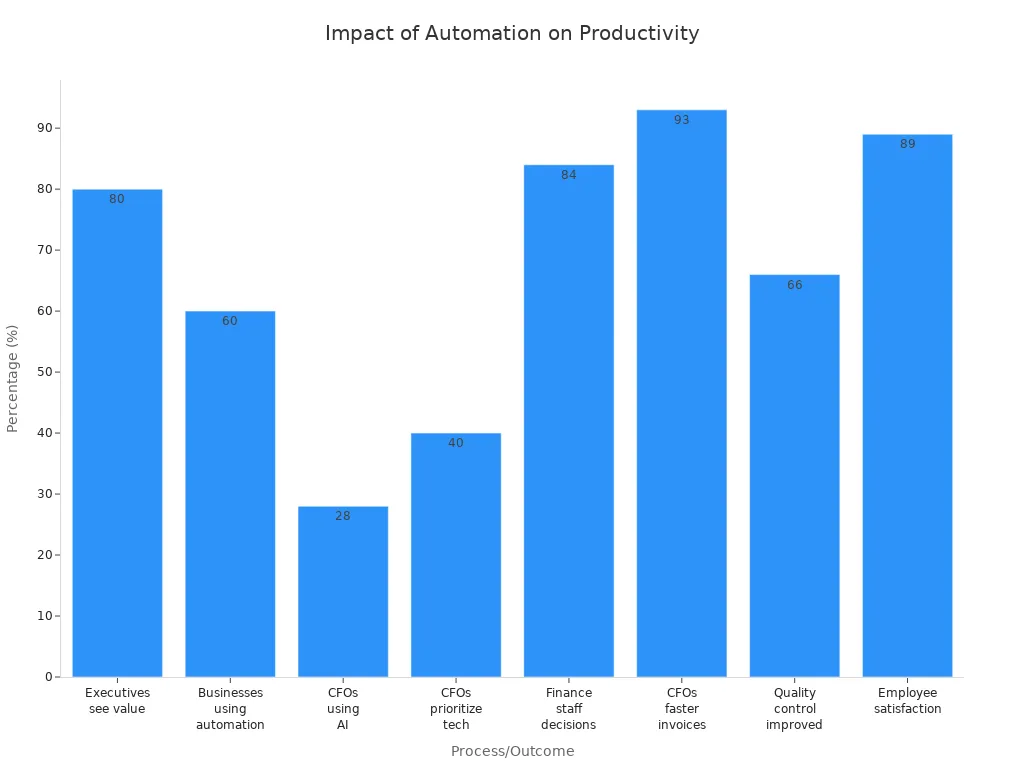
Many executives believe automation supports better business decisions. Finance teams report faster invoice processing and improved quality control. Employees also experience higher job satisfaction and save hundreds of hours each year.
Common Processes
Certain business processes appear as top candidates for automation in many industries. The table below highlights the most frequently automated areas:
Business Process | Percentage (%) |
|---|---|
Operations | 37 |
Onboarding | 16 |
Finance, Accounting, and Legal | 14 |
Compliance | 12 |
Document Management | 8 |
Engineering and R&D | 6 |
Case Management | 4 |
Customer-facing Activities | 2 |
Invoice Processing
Finance teams often Automate Business Processes like invoice approvals and payments. Automation reduces errors, speeds up processing, and improves compliance.
Employee Onboarding
Human resources departments use automation to manage onboarding checklists, document collection, and training assignments. This approach ensures consistency and saves time for both HR staff and new hires.
Customer Support
Customer service teams benefit from automating ticket routing, status updates, and common responses. Automation helps resolve issues faster and improves customer satisfaction.
Tip: Start with processes that are repetitive, time-consuming, and have a clear set of rules. These areas usually deliver the fastest results and help build momentum for wider automation efforts.
Choose Automation Tools
Selecting the right automation tools is a critical step for any organization that wants to Automate Business Processes. The right software can streamline operations, reduce errors, and support business growth. Companies should understand the main categories of automation solutions and how to evaluate them for their unique needs.
BPA Software
Business Process Automation (BPA) software comes in several types. Each category serves different business needs and process complexities. The table below highlights leading solutions and their ideal use cases:
Category | Software Examples | Ideal Use Cases |
|---|---|---|
Robotic Process Automation (RPA) | UiPath, Blue Prism, Automation Anywhere | High-volume, rules-based tasks like data entry and invoice processing. |
Business Process Management (BPM) | Moxo, ProcessMaker, Nintex | Complex, multi-step processes requiring human approvals and optimization. |
Workflow Automation | Microsoft Power Automate, Zapier | Connecting applications and automating data transfers and notifications. |
Document Automation | Various specialized platforms | Automating data extraction from documents like invoices and contracts. |
AI-powered Intelligent Automation | Various advanced platforms | Handling unstructured data and making complex decisions using AI technologies. |
Workflow Automation
Workflow automation tools help teams connect different applications and automate routine tasks. These platforms often use drag-and-drop interfaces, making it easy for users to build workflows without coding. For example, Microsoft Power Automate and Zapier allow businesses to automate notifications, data transfers, and approvals across multiple systems.
RPA and AI Integration
Robotic Process Automation (RPA) handles repetitive, rules-based tasks such as data entry or invoice processing. When combined with artificial intelligence, these tools can process unstructured data and make decisions based on patterns. This integration allows organizations to automate more complex processes and adapt to changing business needs.
Tool Evaluation
Choosing the best automation tool requires careful evaluation of features, usability, and long-term value.
Features and Usability
When comparing automation tools, companies should look for:
Integration capabilities for seamless connectivity with existing systems.
Analytics and performance tracking to monitor workflow efficiency.
Low-code automation options so non-technical users can participate.
Scalability to support business growth and increased data loads.
Customization to fit unique business processes.
Tip: Tools that offer easy integration and low-code features help teams innovate faster and reduce reliance on IT departments.
Cost and Scalability
Cost plays a major role in selecting automation tools. Businesses should consider several factors:
Labor costs saved by reducing manual work.
Time lost due to human errors and inefficiencies.
Expenses from operational bottlenecks and workflow delays.
Ongoing training and workforce development costs.
Return on investment (ROI) from improved efficiency and profitability.
Understanding the total cost of ownership is essential. This includes the initial purchase, maintenance, upgrades, and training. For example, automation systems can range from $500,000 for picking improvement to $25 million for dark warehouse automation. Companies should match their investment to their business size and expected benefits.
By evaluating features, usability, and costs, organizations can select the right tools to support their automation journey.
Implement Automation

Document and Standardize
Organizations must begin automation by documenting every step of their business processes. Clear documentation helps teams understand what happens at each stage. Standardizing these steps ensures everyone follows the same procedures, which reduces confusion and errors.
For example, an online retailer improved its order intake system by organizing item categories. This change made it easier to analyze customer buying patterns and personalize marketing. Streamlined processes also help companies gain better insights and improve outcomes.
Nick Rahn, an operations excellence architect, highlights the importance of establishing clear documentation and tracking practices. These practices support smoother automated workflows and help companies meet regulatory requirements. Simplified processes lead to fewer mistakes, faster results, and higher employee morale. Complex procedures often cause delays and make automation difficult.
Tip: Teams should review each process for unnecessary steps and remove them before starting automation. This approach makes the transition smoother and increases the chances of success.
Set Up and Test
Setting up automation involves several important steps. Teams should follow a structured approach to ensure reliable results:
Identify bottlenecks in current workflows.
Set realistic goals for what automation should achieve.
Get buy-in from all stakeholders.
Start with a small pilot project.
Expand automation efforts gradually.
When building automated solutions, teams should focus on core tasks first. Modular and reusable components make maintenance easier. Data-driven testing separates test logic from test data, which improves accuracy. Writing clear and well-documented test scripts helps everyone understand how the system works.
Teams should also use continuous integration and continuous delivery (CI/CD) tools. These tools monitor the scalability of automation and help catch problems early. Robust logging and monitoring systems make troubleshooting easier.
Start small and scale up over time.
Evaluate the costs and benefits of automation tools.
Use an iterative approach to improve the system step by step.
Note: Testing is not a one-time event. Teams should update and refine their tests as processes change.
Train Staff
Training employees is a key part of successful automation. Workers need to understand how new systems affect their roles. Clear communication helps address concerns and builds trust.
Hands-on training works best. Employees should practice real tasks using automation tools. This approach helps them learn faster and feel more confident. Ongoing education keeps staff up to date with new technology.
Some organizations use a 12-week training program. Employees work with real data and learn about prompt engineering, model selection, and bias detection. Learning from mistakes is part of the process. Early failures help teams improve and adapt.
Provide hands-on practice with automation tools.
Invest in continuous learning and upskilling.
By following these steps, organizations can Automate Business Processes effectively. Teams that document, test, and train carefully see better results and fewer disruptions.
Monitor and Optimize
Successful automation does not end with implementation. Teams must monitor and optimize automated workflows to maintain efficiency and achieve lasting benefits. Monitoring helps organizations detect issues early and make improvements that support business goals.
Automation systems generate performance data. Teams use this information to track progress and identify bottlenecks. Regular reviews ensure that automated processes continue to deliver value. Optimization keeps workflows running smoothly and adapts them to changing needs.
The following steps help organizations monitor and optimize their automation efforts:
Teams regularly monitor automated processes using performance metrics. They check for delays, errors, and areas where tasks slow down. This practice helps them spot bottlenecks and take action quickly.
Stakeholders and team members provide feedback on automation workflows. Their input highlights areas for improvement and ensures that processes meet business requirements.
Organizations keep automation tools updated. New features and enhancements improve performance and security. Updates also help teams Automate Business Processes more effectively.
Teams make adjustments based on performance data. They change workflows to optimize efficiency and reduce waste. This approach ensures that automation delivers consistent results.
Companies establish a culture of continuous improvement. They encourage staff to suggest changes and test new ideas. This mindset helps organizations adapt to new challenges and maintain high standards.
Tip: Teams should document changes and track their impact. Clear records make it easier to review progress and share best practices.
Monitoring and optimization require clear roles and responsibilities. Leaders assign tasks and set expectations for regular reviews. Staff members report issues and suggest improvements. This structure supports accountability and keeps automation projects on track.
Automation evolves over time. Teams must stay alert and respond to new opportunities. By monitoring and optimizing, organizations ensure that automated workflows remain efficient and reliable.
Measure Success and Benefits
Organizations need to track the impact of automation to ensure lasting improvements. Measuring success helps teams understand where automation works best and where they can make further changes. By focusing on key metrics, companies can see clear results and make informed decisions.
Key Metrics
The most effective way to measure the benefits of automation is to use a set of clear metrics. These indicators show how automation changes business performance.
Metric | Description |
|---|---|
Time Saved | Measures the reduction in time taken to complete processes post-automation. |
Error Ratio | Compares the number of errors before and after automation to assess accuracy improvements. |
Deviation Rate | Tracks the frequency of deviations from expected outcomes, indicating process stability. |
Productivity Boost | Evaluates the increase in output and efficiency due to automation. |
Cost Reduction | Assesses the decrease in operational costs as a result of implementing automation. |
Throughput | Measures the amount of work completed in a given time frame, indicating efficiency. |
Compliance | Evaluates adherence to regulations and standards post-automation. |
Qualitative Indicators | Assesses subjective improvements such as employee satisfaction and engagement. |
Time Saved
Automation allows teams to complete tasks faster and handle more work. Many organizations report significant time savings:
Project managers save 20% of their time each day.
Administrative work can be cut in half.
Some companies save thousands of hours by digitizing processes.
73% of IT leaders say automation reduces manual work by 50%.
42% of business leaders agree that workflow automation saves time.
85% of leaders believe automation lets employees focus on important goals.
Error Reduction
Automated systems reduce mistakes by following set rules and logic. This leads to fewer costly errors and more reliable results.
Automation lowers manual errors in IT and business workflows.
It helps employees catch mistakes and process more information.
Manual data entry often has an error rate of 1-4%, but automation can greatly reduce this.
Over 90% of workers see higher productivity with automation.
One company reclaimed over 9 hours per week per employee by reducing errors.
Cost Savings
Cost savings are a major benefit of automation. Companies often see a strong return on investment.
Benefit | Description |
|---|---|
Cost Reduction | Automation can lead to substantial cost savings, with an average ROI of 240%. |
Operational Error Reduction | Business process automation can reduce operational errors by more than 70%. |
Annual Savings | Organizations report saving around $46,000 per year after adopting BPA solutions. |
Continuous Improvement
Automation is not a one-time project. Teams must keep improving their systems to get the best results. Real-time data analysis helps organizations spot problems quickly and adjust their processes. Agile methods, Scrum, and Kanban boards help teams manage changes and track progress. Six Sigma and continuous monitoring support ongoing quality improvements. Regular employee training and performance measurement keep everyone up to date and focused on results.
Teams that Automate Business Processes and review their metrics regularly can adapt to new challenges and maintain high performance.
Automate Business Processes: Real-World Examples
Real-world examples show how organizations use automation to improve efficiency and reduce manual work. The following cases highlight how systems and teams have transformed business operations.
Invoice Automation
Many companies face challenges with invoice processing, such as slow approvals and data entry errors. Automation captures, validates, codes, and routes invoices for approval as soon as they arrive by email, portal, or EDI. This process shortens cycle times and reduces duplicate payments.
Company | Challenge | Solution | Results |
|---|---|---|---|
Siemens | Needed a unified process for incoming invoices | Used Hyland Brainware for intelligent data extraction | Increased automation by up to 80%, improved visibility, and 90% of invoices automated |
MEC | Lacked visibility and collaboration in accounts payable | Adopted Stampli for workflow automation | Improved vendor relationships and accounts payable transparency |
Atlantic Coast Brands | Wanted better control in procure-to-pay | Implemented Stampli for invoice management | Reduced review time and improved cross-department collaboration |
LTC Consulting | Needed a uniform AP process for clients | Integrated Sage Intacct with Stampli | Enhanced client service and understanding of client needs |
Unnamed Company | Overwhelmed by invoice volume and errors | Automated capture and approval workflows | Reduced processing time and improved accuracy to over 99% |
Systems and teams at these organizations worked together to streamline invoice management. They saw faster approvals, fewer errors, and better collaboration.
HR Onboarding
Automated onboarding helps new employees start their jobs smoothly. Systems and teams use automation to create accounts, assign equipment, and send training reminders when a new hire’s record is created or their start date arrives. This approach provides consistent support and helps organizations track each step.
Automated onboarding gives new hires clear guidance and reduces first-day anxiety.
New employees become productive faster, which boosts satisfaction and confidence.
Automation ensures role-based training and introductions, helping new hires connect with colleagues and company culture.
Detailed audit trails support compliance and process improvement.
Clients at systems and teams have used these methods to reduce waiting times and first-week blockers. They now monitor adaptation and performance more easily. To learn more about how your organization can benefit, reach out for more information.
Customer Support Automation
Customer support automation categorizes, prioritizes, and routes tickets as soon as they arrive in helpdesk systems, email, or chat. This process shortens response times and reduces backlogs.
Measurable Outcome | Benefits |
|---|---|
Increased Customer Satisfaction | Higher satisfaction and loyalty, fewer missed or delayed responses |
Improved Operational Efficiency | Handles more requests without extra staff |
Higher Conversion Rates | More bookings and sales, fewer lost leads |
Consistency Across Operations | Fewer errors, stronger brand trust |
Measurable ROI | Tracks every improvement for clear results |
A Stanford-MIT study found that generative AI tools increased agent productivity by 14%. One AI assistant handled 2.3 million conversations per month, equal to the work of 700 full-time agents. Many organizations saw a 210% ROI over three years, with payback in less than six months.
These examples show how organizations Automate Business Processes to achieve measurable improvements. Systems and teams play a key role in designing, implementing, and optimizing these solutions.
Overcome Challenges
Change Management
Change management stands as a major challenge when organizations automate business processes. Employees often worry about job security and may resist new systems. Leaders must address these concerns to ensure smooth adoption. Clear communication helps everyone understand the benefits of automation. Companies use multiple channels to keep stakeholders informed and answer questions.
A strong support structure also plays a key role. Teams need hands-on training that matches their daily tasks. This approach helps users gain confidence and reduces mistakes. Many organizations select "change champions" from within their teams. These advocates encourage others and share positive experiences.
Tip: Training should focus on real tasks and provide ongoing support. This method helps employees adapt and builds trust in the new system.
The table below shows effective strategies for managing change during automation:
Strategy | Description |
|---|---|
Stakeholder Communication | Keep all stakeholders informed through various channels to address concerns and explain benefits. |
Hands-On Training | Provide role-specific training to ensure users are prepared for their specific tasks with the system. |
Change Champions | Designate internal advocates to support and promote the new system among peers. |
Support Structure | Establish a robust support system during the initial implementation phase to assist users. |
Integration Issues
Integration issues often slow down automation projects. Many companies use older, legacy systems that do not connect easily with modern automation tools. These compatibility problems can create data silos and limit the flow of information. As a result, automated processes may not use the most accurate or current data.
Automating inefficient processes can also make problems worse. If a workflow has flaws, automation will repeat those mistakes faster. Teams must review and improve processes before automating them. Scaling automation across many departments can be difficult, especially with basic tools that lack advanced features.
Common integration challenges include:
Data silos that block information sharing
Lack of transparency and traceability in automated workflows
Teams should choose automation tools that offer strong integration features and support for existing systems. Regular reviews help ensure that automated processes remain accurate and reliable.
Data Security
Data security remains a top concern in business process automation. Automated systems often handle sensitive information, making them targets for cyberattacks. Security gaps can expose data and lead to compliance issues.
Organizations address these risks by using several strategies. They conduct risk assessments before and after automation projects. Strong access controls with role-based permissions protect sensitive data. Real-time monitoring tools help detect unusual activity and prevent breaches. Regular compliance checks ensure that automated workflows meet industry standards.
The table below outlines common risks and ways to reduce them:
Risk Type | Description | Mitigation Strategy |
|---|---|---|
Compliance Risks | Automated processes can lead to compliance issues if not properly secured. | Conduct risk assessments and ensure compliance checks. |
Data Security Gaps | Security gaps can expose sensitive information to cyberattackers. | Implement strong access controls and real-time monitoring. |
Ripple Risks | Failures in one automated process can affect others, creating widespread issues. | Use tools to uncover interconnected risks across departments. |
Process Failures | Errors in automation can lead to productivity losses and missed deadlines. | Regularly monitor automated processes and correct issues. |
Note: Training teams on data security best practices helps prevent mistakes and keeps information safe.
By addressing change management, integration, and data security challenges, organizations can automate business processes with greater confidence and success.
Scaling Automation
Scaling automation presents unique challenges for organizations. Many teams succeed with small pilot projects but struggle when expanding automation across departments or business units. Leaders must plan carefully to ensure that automation delivers consistent value as it grows.
A successful scaling strategy starts with a strong foundation. Teams should standardize processes before automating them. Standardization reduces confusion and makes it easier to replicate automation in new areas. Clear documentation supports this effort. Teams can refer to process maps and guides when building new automated workflows.
Tip: Standardize and document processes before scaling. This practice prevents errors and supports faster adoption.
Organizations often face resource constraints during scaling. They may lack enough skilled staff or technical support. Leaders should invest in training and upskilling employees. Cross-functional teams help share knowledge and solve problems quickly. These teams include members from IT, operations, and business units.
Technology selection also plays a key role. Scalable automation tools must handle increased data volumes and more complex workflows. Teams should choose platforms that integrate well with existing systems. Cloud-based solutions often provide flexibility and support rapid growth.
The table below highlights important factors for scaling automation:
Factor | Description |
|---|---|
Process Standardization | Ensures consistency and repeatability |
Employee Training | Builds skills for managing and expanding automation |
Tool Scalability | Supports higher data loads and more users |
Integration | Connects with current and future business systems |
Governance | Sets rules for managing and monitoring automation |
Governance becomes more important as automation expands. Leaders must set clear policies for managing automated workflows. These policies cover access controls, change management, and performance monitoring. Regular audits help maintain quality and compliance.
Teams should monitor performance metrics as they scale. Key indicators include process speed, error rates, and user satisfaction. Continuous improvement ensures that automation adapts to changing business needs.
Common pitfalls can slow down scaling efforts. These include automating broken processes, ignoring employee feedback, and underestimating technical requirements. Teams should address these issues early to avoid setbacks.
Note: Start small, learn from each phase, and expand gradually. This approach reduces risk and builds confidence in automation.
Scaling automation requires commitment from leadership and staff. With careful planning, strong governance, and ongoing training, organizations can achieve greater efficiency and long-term success.
To Automate Business Processes, teams should follow these steps:
Analyze and document current workflows.
Prioritize tasks that offer the most value.
Select the right automation tools.
Train staff and monitor results.
Optimize and scale successful solutions.
Starting small helps teams build confidence and see quick wins. For more guidance, readers can contact systems and teams to learn how automation can reduce manual work.
FAQ
What is business process automation?
Business process automation uses technology to perform repetitive tasks. Teams replace manual steps with automated workflows. This approach increases speed and reduces errors.
Which business processes are best for automation?
Teams often automate tasks that repeat often and follow clear rules. Examples include invoice processing, employee onboarding, and customer support ticket routing.
How does automation reduce manual work?
Automation shifts routine tasks from people to machines. Employees spend less time on data entry and approvals. They focus on higher-value activities.
What tools help automate business processes?
Popular tools include robotic process automation (RPA), workflow automation platforms, and AI-powered solutions. Teams select tools based on process complexity and integration needs.
How can organizations measure automation success?
Teams track metrics like time saved, error reduction, cost savings, and productivity. Regular reviews help identify improvements and maintain efficiency.
What challenges do teams face when automating processes?
Teams may encounter resistance to change, integration issues, and data security concerns. Training and clear communication help overcome these challenges.
Is automation scalable for growing businesses?
Automation scales well when teams standardize processes and choose flexible tools. Cloud-based platforms and strong governance support expansion across departments.
How can staff adapt to new automated workflows?
Hands-on training and ongoing support help employees learn new systems. Open communication builds trust and confidence in automation.


